DOCKER
DEVOPS FOUNDATIONS
Badr Tajini · ESILV · 2026–2027
Skip to e-book content

Interactive e-book: DevOps Foundations with Docker

AN INTERACTIVE FIELD GUIDE · ESILV 2026–2027

The Docker course,
at your pace.

One application. Six practical improvements. One project you can explain and recover.

Follow a visual model, try one conceptual experiment, explain the result, then use the idea in your lab.

01—06

Six questions.
One growing service.
A path you can explain.

⌘
My Laptop / local terminal
Execution guidance

Type in your project folder on your laptop. Open its local browser. Docker Desktop uses a local Linux VM; no SSH is needed.

Environment setup ↗

START WITH THE STORY

Start — the course story

An application running once is a useful beginning. An application that somebody else can build, identify, operate and recover is a delivery system.

We start with one ready-made web container. Then we build our supplied API, connect its database, operate the whole stack, reduce unnecessary permissions and automate a release. The final project is that same work, integrated and explained.

Use your laptop by default, or your own Ubuntu cloud server if you want to manage one. Engineer Mode shows Badr's approach on Hades; it does not give you access to his machine. The Docker learning goals and grading are the same.
FIND THE PICTURE FIRST

Concepts — find the picture first

An image is a packaged template. A container is a particular instance of that image, with its own lifecycle. A registry stores images for download. A digest identifies exact content; a tag is a name that can move.

A network connects selected containers. A volume keeps data outside a container's disposable writable layer. A release connects a source revision, an exact image and tests that tell us whether it behaves as intended.

Explore the Interactive Companion. Its simulations explain these relationships; they do not execute Docker or certify your project.

New to Docker? Check your environment before Chapter 1. TD0 is ungraded preparation.

Open TD0 setup →Begin Chapter 1 →
Other course routes

Read a chapter when you want the story calmly. Open the Companion when you want to experiment with a concept; open the Lab Portal when you want the commands for today's work.

Course Home · Concepts · Today's lab · My project

CHAPTER 01 · CM1 / TD01

what is actually running?

Containers & lifecycle · One idea to understand before TD01

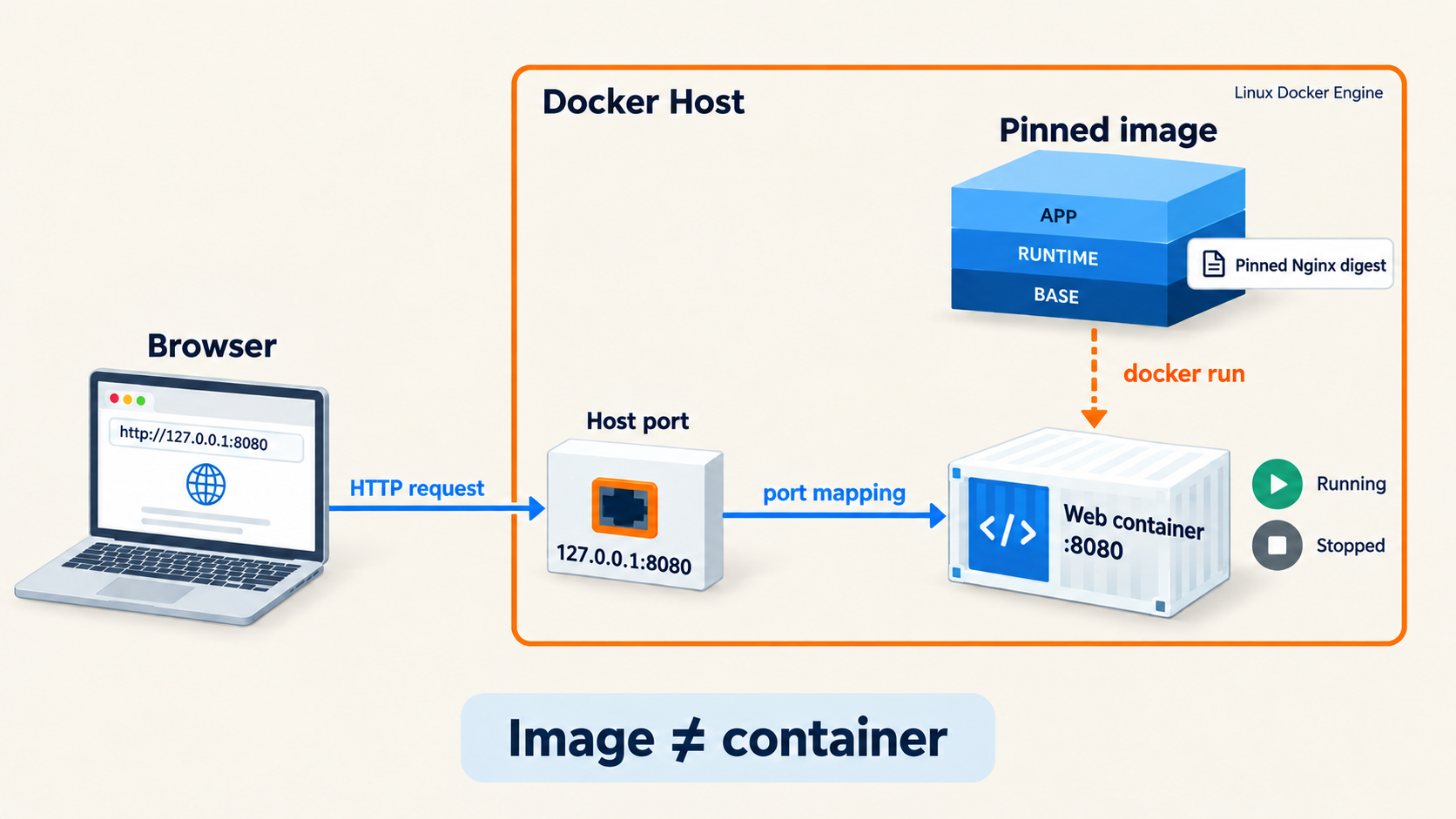
A pinned image creates a distinct web container. Browser traffic enters the Docker host through 127.0.0.1:8080, then reaches container port 8080. Stopping or removing that container does not remove its source image.
TD1 / Image and instance

TD1 establishes the runtime with a ready-made web stand-in; the supplied API starts in TD2. Follow the highlighted relationship before trying the lab.

01 · Understand the system

What is the model telling us?

Docker's client sends a request to the Docker Engine. The engine creates and manages containers. The terminal you type in and the host where the engine runs may be different machines. Docker Desktop adds a Linux virtual machine underneath your containers.

Stopping a container stops its main process; it does not remove the container. Removing a container removes its writable layer. Recreating it from the same image creates a new instance. This is why image identity and saved run instructions matter.

02 · Change one thing

Container lifecycle

CONCEPTUAL EXPERIMENTContainer lifecycle

Watch what changes when a container stops, starts, or is replaced. Predict the result, use the controls, then explain what changed.

This model does not run Docker or verify your lab. Use the lab checks to collect real evidence.

03 · Explain the result

Why does this matter?

A published port is a route from the host to a container. Binding it to 127.0.0.1 keeps that host-side entry local. On your laptop, use the browser directly. On your cloud server, use an SSH tunnel from the laptop to that server's loopback.

Before the lab: say what you expect to change, and what observation would prove it.

PUT THIS INTO YOUR PROJECT

TD1 establishes the runtime for the same project.

The lab provides the commands and evidence checks. The project view shows what this stage adds.

Next: chapter 2 →

CHAPTER 02 · CM2 / TD02

what exactly did we build?

Images & identity · One idea to understand before TD02

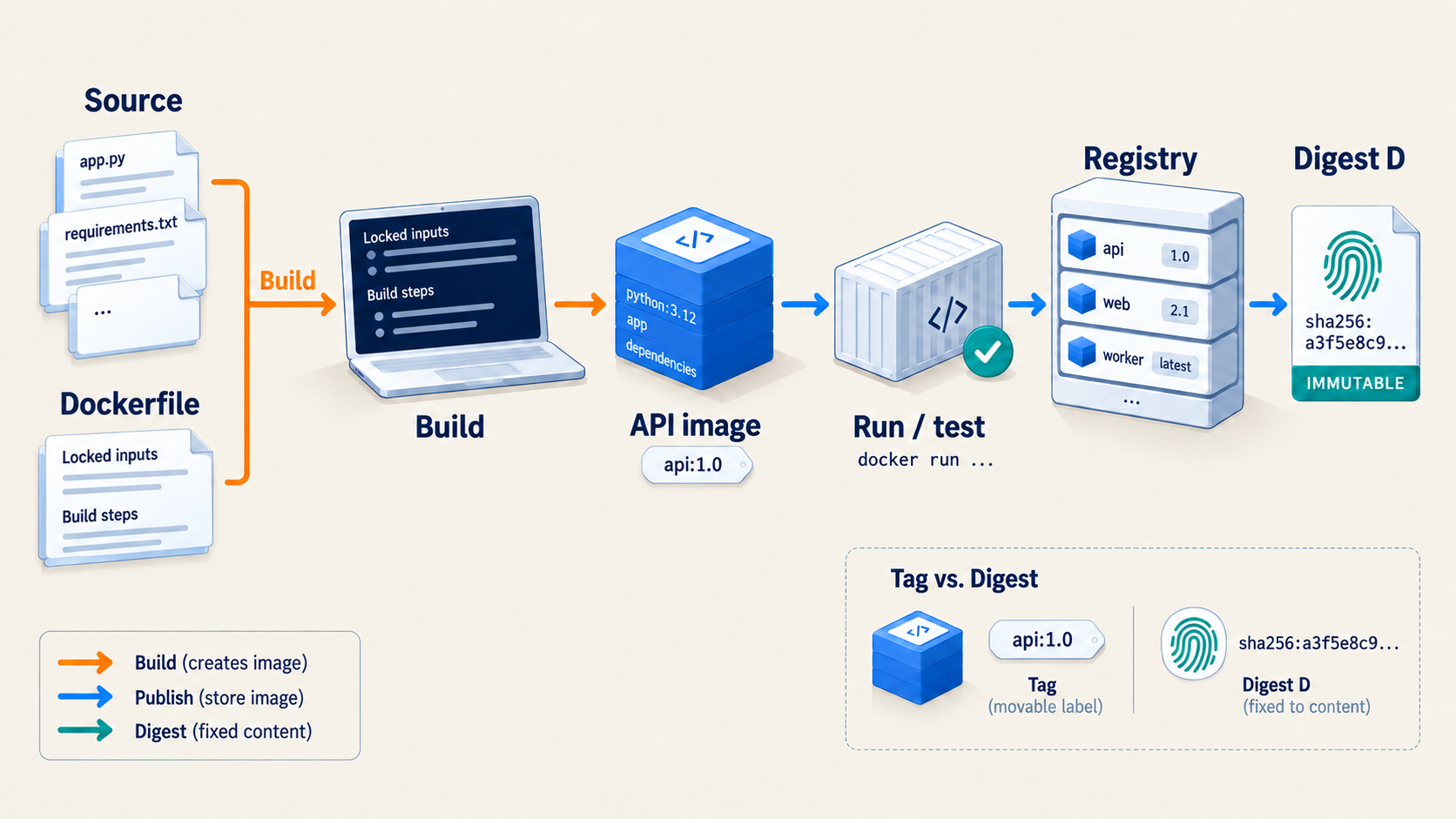
Source and Dockerfile are build inputs. The API image is run and tested before publication. The registry stores the resulting artifact; digest D identifies its exact content.
TD2 / Source to exact artifact

One application after TD02. Follow the highlighted relationship before trying the lab.

01 · Understand the system

What is the model telling us?

The build context is the set of files the builder can see. .dockerignore keeps unrelated files and secrets out. A Dockerfile describes the steps that turn source and dependencies into an image. A multi-stage build separates build tools from the runtime image.

Cache can make an unchanged step faster, but it does not prove correctness or reproducibility. Check what went into the image, which user runs the application, and what its health and version endpoints actually report.

02 · Change one thing

Artifact identity

CONCEPTUAL EXPERIMENTArtifact identity

Move a tag, then compare it with the content identified by a digest. Predict the result, use the controls, then explain what changed.

This model does not run Docker or verify your lab. Use the lab checks to collect real evidence.

03 · Explain the result

Why does this matter?

A Git commit identifies source; a registry digest identifies image content. They are related, not interchangeable. Build from the intended source, record the resulting digest, and pull that exact digest when you want the same artifact elsewhere.

Before the lab: say what you expect to change, and what observation would prove it.

PUT THIS INTO YOUR PROJECT

TD02 develops the same application.

The lab provides the commands and evidence checks. The project view shows what this stage adds.

Next: chapter 3 →

CHAPTER 03 · CM3 / TD03

what must survive replacement?

Networks & state · One idea to understand before TD03

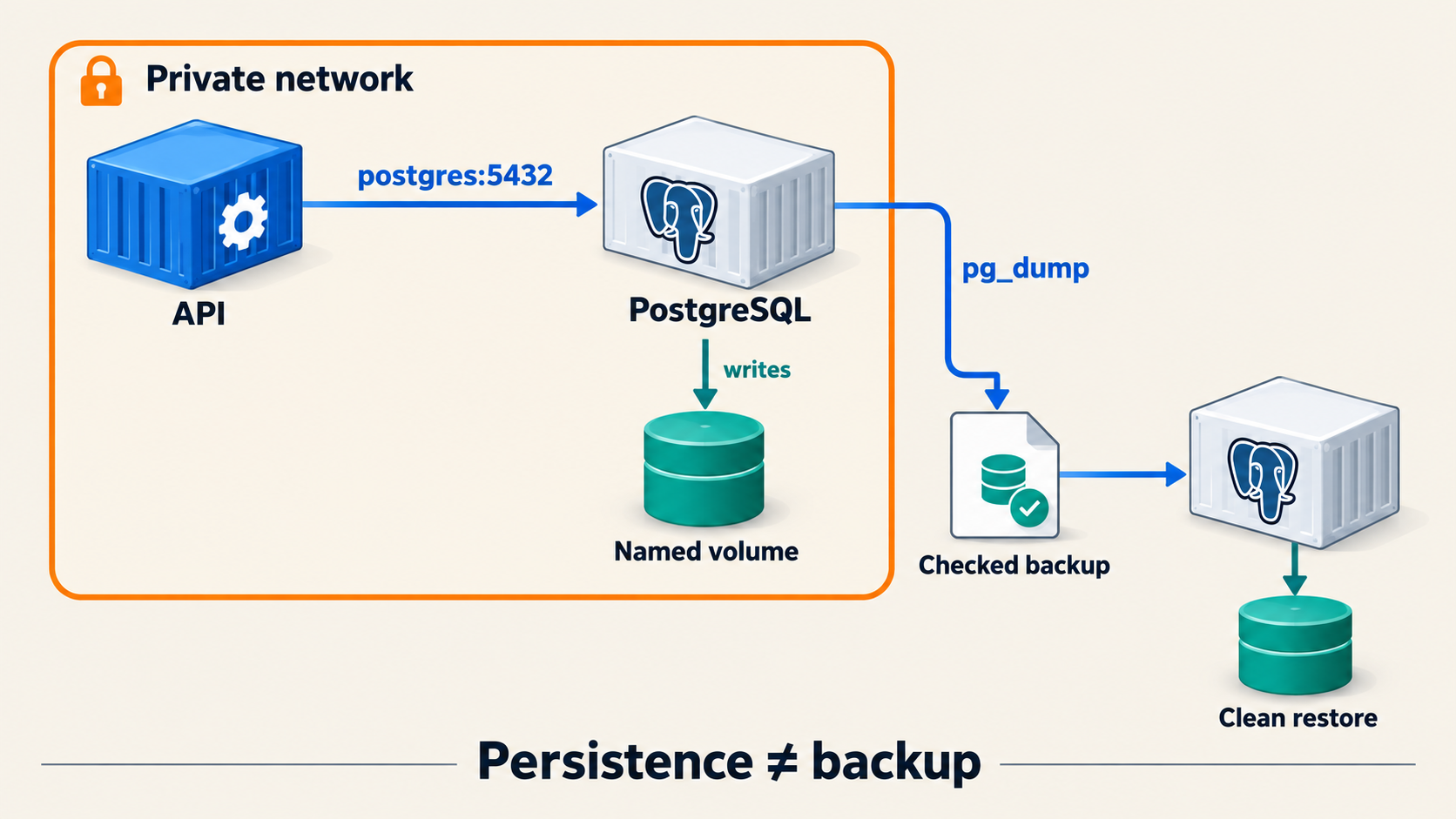
API calls PostgreSQL at postgres:5432 on a private network. Database files live in a named volume. A separate pg_dump backup is checked and restored into a clean, separate destination; persistence alone is not a backup.
TD3 / Private network, durable data

One application after TD03. Follow the highlighted relationship before trying the lab.

01 · Understand the system

What is the model telling us?

Inside the API container, localhost means the API container itself. The database is another container, so the API connects to the database's name on their private Docker network: postgres:5432. The database does not need a published host port for that conversation.

Configuration tells the application where to connect. A secret file supplies a sensitive value without baking it into an image or putting it in the command line. Mount only what each service needs, and check actual readability by the service user.

02 · Change one thing

Network and data lifetimes

CONCEPTUAL EXPERIMENTNetwork and data lifetimes

Change the caller and trace which address each service can reach. Predict the result, use the controls, then explain what changed.

This model does not run Docker or verify your lab. Use the lab checks to collect real evidence.

Explore the caller and private DNS
CONCEPTUAL EXPERIMENTCaller-relative localhost

Switch the origin and identify which localhost and service name are valid. Predict the result, use the controls, then explain what changed.

This model does not run Docker or verify your lab. Use the lab checks to collect real evidence.

Explore what survives replacement
CONCEPTUAL EXPERIMENTContainer versus volume lifetime

Replace the container, then compare a persistent volume with a separate backup. Predict the result, use the controls, then explain what changed.

This model does not run Docker or verify your lab. Use the lab checks to collect real evidence.

03 · Explain the result

Why does this matter?

A named volume survives replacement of its container. That is persistence, not a backup. A backup is a separate recoverable copy. You know it is useful only after checking its integrity and restoring it into a clean destination, then reading the expected data.

Before the lab: say what you expect to change, and what observation would prove it.

PUT THIS INTO YOUR PROJECT

TD03 develops the same application.

The lab provides the commands and evidence checks. The project view shows what this stage adds.

Next: chapter 4 →

CHAPTER 04 · CM4 / TD04

why is this service not ready?

Compose & diagnosis · One idea to understand before TD04

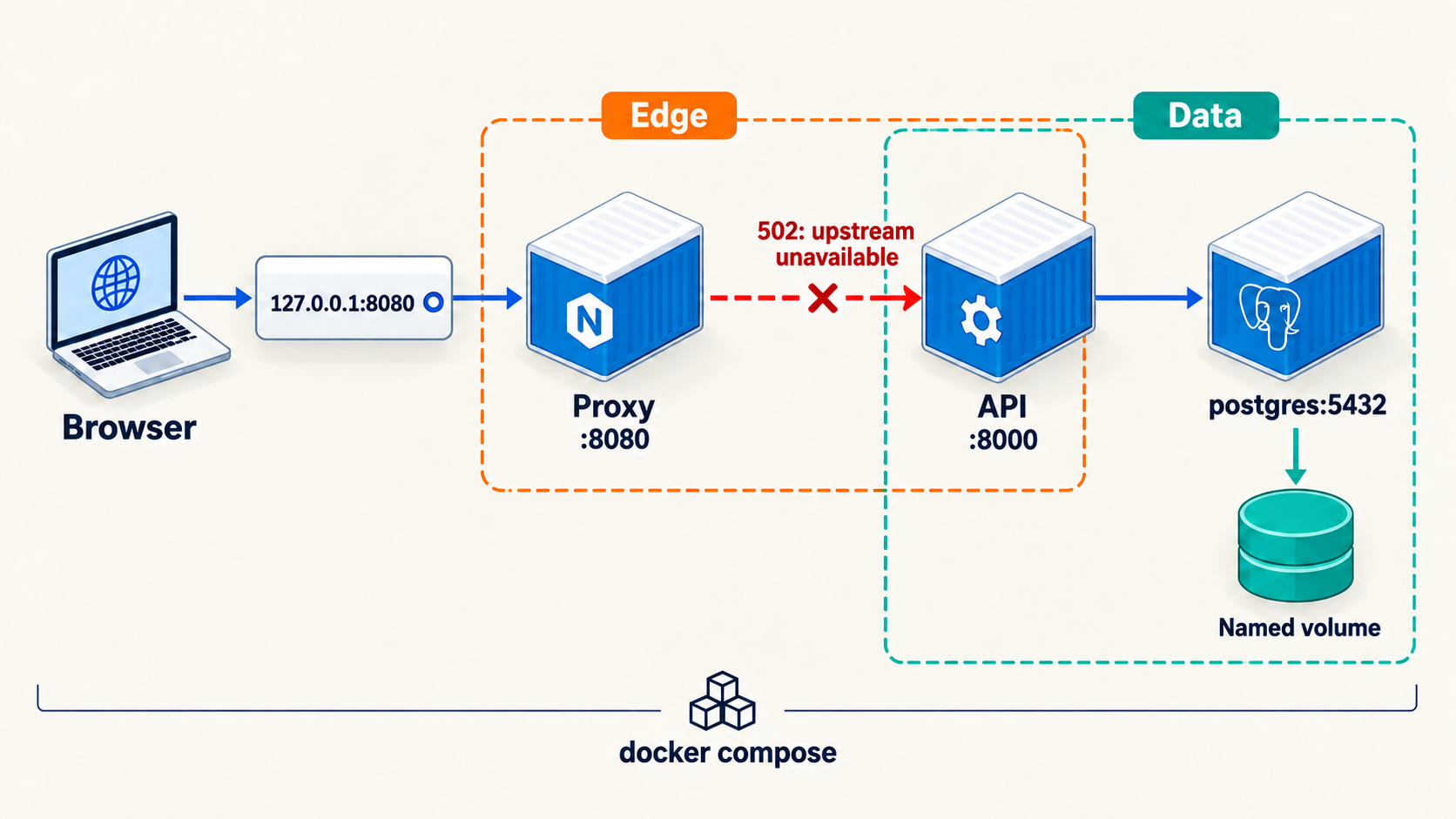
Only the proxy is published on host loopback. Proxy and API share the edge network; API and PostgreSQL share the data network. A failed proxy-to-API connection is highlighted as a possible 502 upstream failure, distinct from database readiness failure.
TD4 / Follow one request

One application after TD04. Follow the highlighted relationship before trying the lab.

01 · Understand the system

What is the model telling us?

Compose describes services, networks, volumes and their relationships in one model. A service is the intended role; a container is a running instance. “Running”, “healthy” and “ready for requests” answer different questions.

Follow a request from browser to proxy, then API, then database. When it fails, preserve the symptom. State one hypothesis and choose a test that can distinguish it from another explanation. Change one thing, then run the same test again.

02 · Change one thing

Follow the failed request

CONCEPTUAL EXPERIMENTFollow the failed request

Trace one request through the proxy, API, and database before choosing a test. Predict the result, use the controls, then explain what changed.

This model does not run Docker or verify your lab. Use the lab checks to collect real evidence.

03 · Explain the result

Why does this matter?

A useful repair includes regression checks: the original symptom is gone, and the paths that worked before still work. Restarting everything before observing can hide the cause.

Before the lab: say what you expect to change, and what observation would prove it.

PUT THIS INTO YOUR PROJECT

TD04 develops the same application.

The lab provides the commands and evidence checks. The project view shows what this stage adds.

Next: chapter 5 →

CHAPTER 05 · CM5 / TD05

what are we trusting?

Security & trust · One idea to understand before TD05

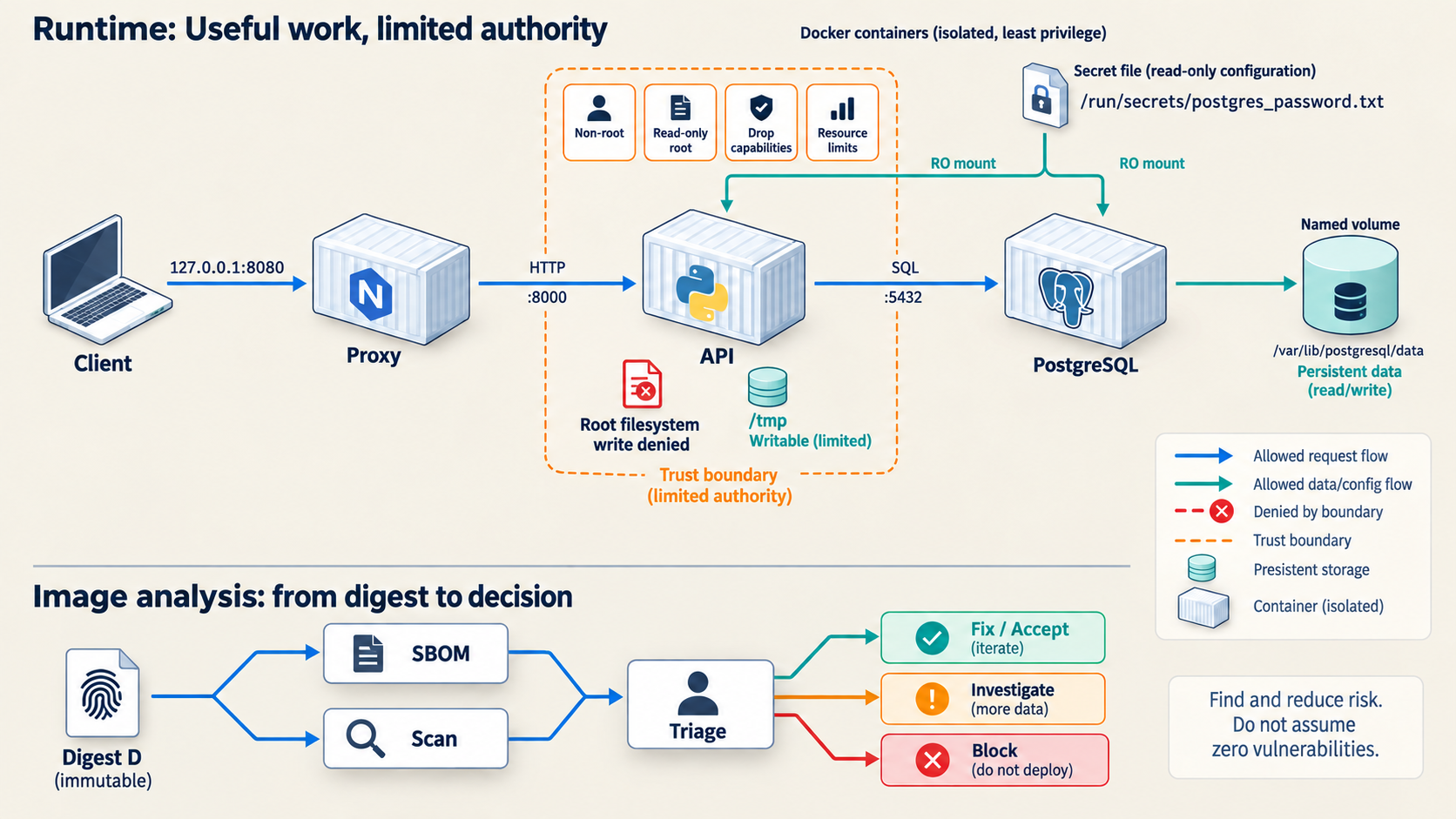
The same application receives service-specific privilege limits while required temporary and database writes remain possible. A protected secret file is separate from the image. SBOM and scan results are tied to digest D and require human triage.
TD5 / Useful work, limited authority

One application after TD05. Follow the highlighted relationship before trying the lab.

01 · Understand the system

What is the model telling us?

Least privilege means giving each process the access it needs and limiting the consequences of a mistake. Non-root users, dropped capabilities, a read-only root filesystem and a narrow writable area are different controls; one does not substitute for all the others.

Test both directions: the application still performs its intended job, and an operation it should not perform is refused. Avoid privileged containers and Docker socket mounts in the application stack.

02 · Change one thing

Test the boundary

CONCEPTUAL EXPERIMENTTest the boundary

Compare an allowed application action with one the runtime should refuse. Predict the result, use the controls, then explain what changed.

This model does not run Docker or verify your lab. Use the lab checks to collect real evidence.

03 · Explain the result

Why does this matter?

An SBOM lists components. A vulnerability scan reports findings about a particular artifact at a particular time. Tie both to the exact image digest. Review severity, applicability and possible fixes; state residual risk instead of calling an image “secure” because a command completed.

Before the lab: say what you expect to change, and what observation would prove it.

PUT THIS INTO YOUR PROJECT

TD05 develops the same application.

The lab provides the commands and evidence checks. The project view shows what this stage adds.

Next: chapter 6 →

CHAPTER 06 · CM6 / TD06

can we deliver the same artifact and return safely?

Release & recovery · One idea to understand before TD06

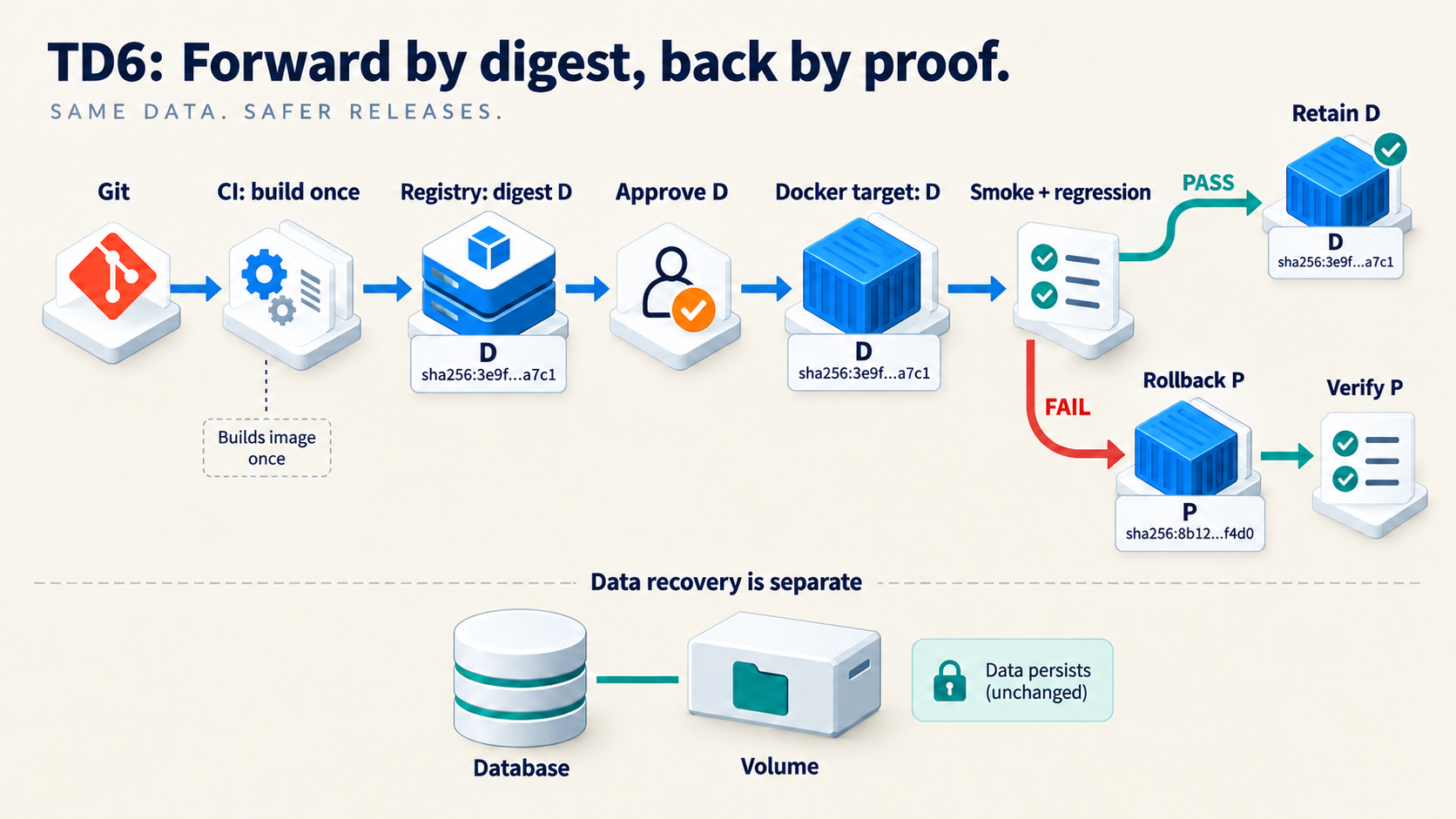
CI builds once and publishes digest D. A human approves that digest; the target pulls and tests it. Passing tests retain D. Failure restores and verifies previous known-good digest P. Application rollback does not rewind database data.
TD6 / Forward by digest, back by proof

One application after TD06. Follow the highlighted relationship before trying the lab.

01 · Understand the system

What is the model telling us?

The pipeline validates source and definitions, builds an image, records its identity and checks it. Limit each job's permissions. Publishing an image and deploying it are separate actions; the target host should receive the exact approved digest.

Smoke tests ask whether the deployed application can perform a few important actions. Keep a previous known-good digest before promotion. If the new version fails, restore that application version and test it again.

02 · Change one thing

A release decision

CONCEPTUAL EXPERIMENTA release decision

Approve, deploy, verify, then return to the previous known-good digest when needed. Predict the result, use the controls, then explain what changed.

This model does not run Docker or verify your lab. Use the lab checks to collect real evidence.

03 · Explain the result

Why does this matter?

Application rollback does not rewind database data. An old application may be incompatible with a new schema. Data recovery requires its own tested backup and restore procedure; never treat volume deletion as rollback. Kubernetes is the next-course handoff, not another cluster-administration assignment here.

Before the lab: say what you expect to change, and what observation would prove it.

PUT THIS INTO YOUR PROJECT

TD06 develops the same application.

The lab provides the commands and evidence checks. The project view shows what this stage adds.

Next: support →

SUPPORT · THE FULL PATH

Keep the system
understandable.

Find the lab route, project handoff, key terms, and help when an observation surprises you.

LabsLab connections

TD0 — tools → TD1 — container → TD2 — image → TD3 — data → TD4 — operations → TD5 — security → TD6 — release.

There is one lab page for each stage. Its environment box tells you where to type. Its target diagram predicts the system you should observe. Its checks tell you what to verify before moving on.

ProjectProject connections

You have already built the project during the labs. Finish the integration, check that it can be replayed, describe one failure and its repair, and practice explaining your own decisions.

Defense window: 30 November–4 December 2026. Each student has an individual 8–10 minute defense under the published protocol. The window is not a submission deadline; Badr will communicate appointments and submission arrangements.

See project progress and defense readiness.

GlossaryGlossary
  • Host: the machine running the Docker Engine; with Desktop, the engine is inside its Linux VM.
  • Loopback: an address referring back to the machine or network namespace where the request starts.
  • Port publication: a host-side route to a container port.
  • Health: the result of a configured check; inspect what that check actually tests.
  • Readiness: whether the application can currently serve the intended request, including necessary dependencies.
  • Immutable: identified by content that cannot change under that identifier.
  • SBOM: a software bill of materials, listing components in an artifact.
  • Rollback: return the application to a previous known-good version; data recovery is separate.

Go deeper: full glossary · Official references

HelpHelp

Open the current lab's “If it fails” guidance first. Ask on Discord remotely or Badr on campus with the exact command, exact error and My Laptop / My Own Cloud. Never send secrets. Engineer Mode is a reference you can consult, not a third runtime to report.

The e-book explains the ideas. Your lab results, source, and recorded observations support your project claims.

Open full-resolution image · pinch to zoom ↗