Execution guidance
Type in your project folder on your laptop. Open its local browser. Docker Desktop uses a local Linux VM; no SSH is needed.
Execution guidance
After SSH, your shell is on the server. Use the laptop’s SSH tunnel to reach the server’s loopback service. Same lab, different host.
Reference evidence boundary
A sanitized engineering walkthrough, not a live connection. Historical TD1/TD2 local observations; registry and TD3–TD6 Hades replay remain unexecuted.
TD02 · My Laptop
01 / WHERE AM I?
TD2 — Build our application image
Duration: 180 minutes. Assessment: TD2 contributes 8 course points.
Where are we in the project?
TD1 used a ready-made web image and proved its container lifecycle. Today the same project gains its own API image from the supplied Flask/Gunicorn application. TD3 will add its PostgreSQL dependency.
This stage adds: Our own reproducible API image, identified by digest.
TD02 · My Laptop
02 / TODAY'S MISSION
Today's mission
Build the canonical application image from a controlled context, prove its runtime identity and HTTP behavior, then publish and run the exact GHCR digest when registry access is available.
TD02 · My Laptop
03 / FINAL ARCHITECTURE IMAGE
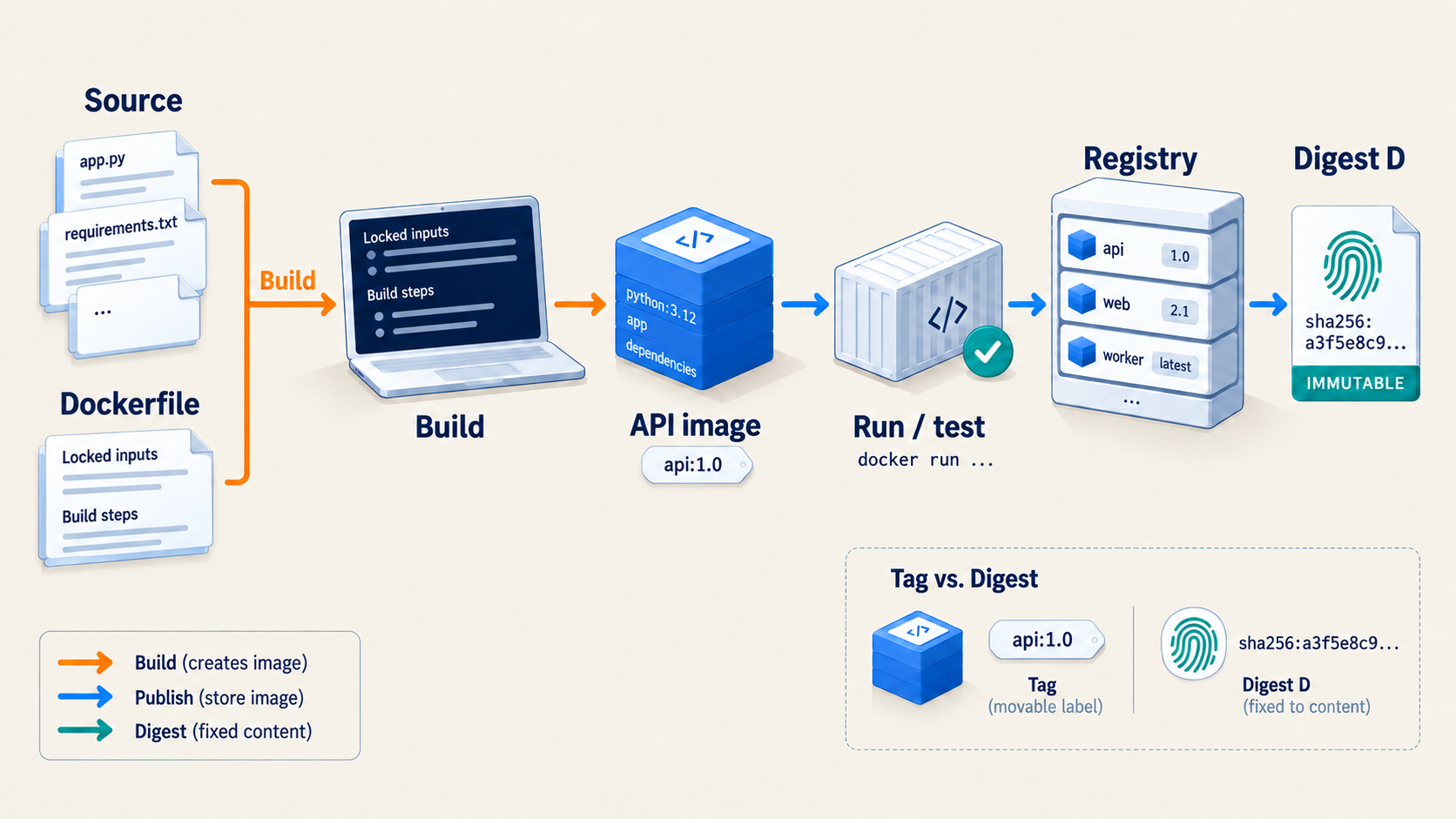
TD02 · My Laptop
04 / MY ENVIRONMENT
Before you start
Before you start
Use your copy of the supplied project starter. It contains the Flask API, wsgi.py, locked requirements, a partially completed Dockerfile, a partially completed .dockerignore, and scripts/course-env.sh. The STUDENT-TASK(TD02) markers identify work for you to finish. Keep the source, lock and course version files together. You need Git, Python 3, curl and Docker; the setup page covers the environment and your private project repository. Keep one Bash terminal open for variables you create during the build and registry steps.
My Laptop
Run Docker commands in your local project-root Bash terminal. On Windows, use Ubuntu under WSL2 with Docker Desktop integration. Browse http://127.0.0.1:8080/healthz after running your image.
My Own Cloud
SSH to your own Ubuntu server and run the same work from its copy of your project. The Docker Engine and 127.0.0.1:8080 endpoint are on that server. For a laptop browser, use a separate laptop terminal with ssh -N -o ExitOnForwardFailure=yes -L 127.0.0.1:8080:127.0.0.1:8080 your-user@your-server. Keep provider ingress limited to SSH.
Engineer Mode explains VPS context without giving you Badr's finished build definition.
Type in your local Bash terminal. Docker runs on your laptop or inside Docker Desktop’s Linux VM. Open browser checks on your laptop.
After SSH, type Docker commands in your own Ubuntu server’s terminal. For browser checks, use a separate laptop terminal for the SSH tunnel. The server’s localhost and your laptop’s localhost are different.
Engineer Mode is Badr’s sanitized Hades reference. Students do not log in to Hades. Use your own laptop or server for the lab commands.
TD02 · My Laptop
05 / STEP-BY-STEP WORK
05 / STEP-BY-STEP WORK
Do the work, one step at a time.
Follow the commands in order. Keep the same terminal open so values from earlier steps remain available.
Step 1 — Complete the image definition · 30 minutes
Read the starter Dockerfile, .dockerignore, wsgi.py and locked requirements.txt. Finish the marked Dockerfile tasks: install hash-locked dependencies in a builder, use a separate runtime stage, copy only runtime dependencies and the supplied API files, select UID/GID 10001, add version/source/revision OCI labels, expose the API's port 8000, provide a bounded /healthz check, and start Gunicorn with wsgi:application in exec form. Complete .dockerignore so Git metadata, credentials, local environments, caches, tests and evidence stay out of the build context. Keep the approved digest-pinned base. Review docker build --help and Dockerfile reference syntax as needed. Inspect both files before building; remove the TD2 task markers only after you have implemented and explained each item.
Step 2 — Build twice and inspect source identity · 35 minutes
Commit the completed definition and record the full Git SHA with git rev-parse HEAD. Build the same source twice with docker build, passing your version, Git SHA and repository URL as build arguments. Save both build logs under evidence/TD02/ and compare which steps used cache. Inspect the resulting image's configured user, OCI revision/source labels and health check. A tag helps find the candidate; your recorded source SHA explains which commit it represents. If build fails, keep the first error and check the locked dependency install and the wsgi:application target.
Use this build invocation after completing your own Dockerfile. It exercises your definition; it does not supply it. Repeat the same build with a different log filename to compare cache behavior.
set -o pipefail
. scripts/course-env.sh
release_sha="$(git rev-parse HEAD)"
local_image="delivery-api:$release_sha"
read -r -p 'Your repository web URL: ' source_url
mkdir -p evidence/TD02
docker build --platform "$COURSE_IMAGE_PLATFORM" --progress=plain \
  --build-arg "PYTHON_IMAGE=$PYTHON_IMAGE" --build-arg "GIT_SHA=$release_sha" \
  --build-arg APP_VERSION=0.2.0 --build-arg "SOURCE_URL=$source_url" \
  --tag "$local_image" . 2>&1 | tee evidence/TD02/build-first.txt
docker image inspect "$local_image" --format '{{.Config.User}} {{json .Config.Labels}}'
Step 3 — Run the candidate and test its HTTP contract · 30 minutes
Run your image as td02-api with only host loopback port 8080 mapped to container port 8000. Use a TD02 label so cleanup is bounded. The supplied app requires a password field to start. For this database-absent test only, pass --env POSTGRES_PASSWORD=unused-td02-placeholder to your run command. This is an explicitly unused example value, not a credential. TD3 replaces it with a protected file secret; never use a real password in a run argument. PostgreSQL is intentionally absent today. Request /healthz, /version and /readyz with curl, saving status codes and bodies. For example, once the container is running:
curl --include http://127.0.0.1:8080/healthz
curl --include http://127.0.0.1:8080/version
curl --include http://127.0.0.1:8080/readyz
Expect liveness to succeed, version to report the image's Git SHA, and readiness to report a non-ready HTTP response until TD3 supplies PostgreSQL. Inspect the container user, logs and port binding when any result differs.
Step 4 — Publish and test an immutable registry reference · 55 minutes
Use your own private project repository and package namespace. Authenticate to GHCR without putting a token in a shell argument, file or screenshot. Tag the tested candidate with its full Git SHA, push it, resolve the registry @sha256: digest, then pull and run by that digest. Repeat the version request and compare its Git SHA with your saved build revision. Record the observed registry reference in release.env as DELIVERY_API_IMAGE=ghcr.io/...@sha256:...; never substitute a local image ID or mutable tag for the registry digest. If access is unavailable, mark this gate BLOCKED with the redacted error and keep the local tests; do not claim a published digest.
These commands teach the registry mechanics for your tested image. Set the namespace to your own lower-case GitHub owner/repository, not a course account. First read the block, then run it in the same Bash terminal as your local build.
read -r -p 'Your GitHub username: ' GHCR_USERNAME
read -r -p 'Your lower-case owner/repository: ' PROJECT_REPOSITORY
registry_image="ghcr.io/$PROJECT_REPOSITORY/delivery-api"
(
  set -euo pipefail
  set +x
  ghcr_endpoint="$(docker context inspect "$(docker context show)" --format '{{.Endpoints.docker.Host}}')"
  case "$ghcr_endpoint" in unix://*) ;; *) echo 'Stop: use the intended local Engine'; exit 1;; esac
  export DOCKER_HOST="$ghcr_endpoint"
  unset DOCKER_CONTEXT
  export DOCKER_CONFIG="$(mktemp -d)"
  trap 'unset ghcr_token; docker logout ghcr.io >/dev/null 2>&1 || true; rm -f -- "$DOCKER_CONFIG/config.json"; rmdir -- "$DOCKER_CONFIG"' EXIT
  read -r -s -p 'GHCR package-write token: ' ghcr_token
  printf '\n'
  printf '%s' "$ghcr_token" | docker login ghcr.io --username "$GHCR_USERNAME" --password-stdin
  unset ghcr_token
  docker tag "$local_image" "$registry_image:$release_sha"
  docker push "$registry_image:$release_sha" 2>&1 | tee evidence/TD02/push.txt
  docker pull "$registry_image:$release_sha"
  docker image inspect "$registry_image:$release_sha" --format '{{json .RepoDigests}}'
  read -r -p 'Paste your observed ghcr.io/...@sha256:... coordinate: ' digest_ref
  case "$digest_ref" in ghcr.io/*@sha256:*) ;; *) echo 'Expected your observed registry digest'; exit 1;; esac
  docker pull "$digest_ref" 2>&1 | tee evidence/TD02/pull-digest.txt
  printf 'DELIVERY_API_IMAGE=%s\n' "$digest_ref" > release.env
)
Package-write authentication must be yours and authorized for that namespace. The block keeps registry login in a temporary directory and does not expose the token. If it fails, preserve the redacted error; do not create release.env with a made-up digest. Next run your image by the observed digest and repeat the HTTP checks from Step 3. After the temporary login closes, a fresh private pull needs a new authorized login. Existing local images remain available for your test.
Step 5 — Check and hand off to TD3 · 30 minutes
Remove only your labelled temporary td02-api container. Keep the tested local image, actual build logs, HTTP results and digest evidence. Compare the image revision with the /version response and, if Step 4 succeeded, the digest-run response. Write the result and any BLOCKED gate in evidence/TD02/OBSERVATIONS.md. Commit the non-secret release.env only when it contains an actual registry digest. TD3 will attach this same API image to PostgreSQL.
TD02 · My Laptop
06 / LIVE CHECKPOINT
Run the source checks in your terminal, then compare your observations. Browser markers are your own record, not a verification result.
Check it
Inspect your Dockerfile and .dockerignore: no TD2 task marker remains, the pinned base and locked install are present, the runtime user is non-root, and the build context excludes secrets and evidence. Use docker image inspect to compare the user, OCI source revision and health check with your intended definition. Compare the saved /healthz, /version and /readyz status codes with actual JSON; readiness should be non-ready without PostgreSQL. Confirm td02-api has been removed. If you published, inspect release.env and pull/run by the observed @sha256: digest before claiming a registry pass. Review your saved build, HTTP and registry observations; only actual command output can support a PASS claim.
TD02 · My Laptop
07 / WHAT CHANGED IN MY PROJECT
What did we add to the project?
Before: a ready-made TD1 web image. This TD added: the supplied API source packaged by the canonical multi-stage Dockerfile, non-root runtime, Git/OCI identity, and a GHCR digest when published. After: the temporary API container is removed; the tested image and release.env remain. Next: TD3 supplies PostgreSQL, a secret file and persistent state.
TD02 · My Laptop
08 / ENGINEER MODE
REAL VPS CONTEXT / NO STUDENT ACCESS TO HADES. See how this concept looks on a real VPS; perform and justify the assessed work on your own machine.
Engineer Mode
On a VPS, the Git checkout, Docker build, local HTTP probes and registry authentication all occur on the remote host. The laptop uses an SSH tunnel only to inspect the loopback HTTP endpoint in a browser. Compare the roles of a Git SHA, a local image ID, a mutable tag and a registry digest before publishing your own image. The instructor release holds Badr's complete Dockerfile and Hades command sequence.
TD02 · My Laptop
09 / HELP
I'm stuck
| Symptom | Check | First correction |
|---|---|---|
| Build reports a missing hash or package | evidence/TD02/build-first.txt and requirements.txt |
Restore the supplied locked requirements.txt; rerun the exact build. |
| Gunicorn exits | docker logs --tail 50 td02-api |
Restore wsgi:application and the TD2 placeholder password field; rebuild and rerun. |
/healthz is unreachable |
docker ps -a --filter name=td02-api and docker port td02-api |
Correct the observed startup or port error; keep host publication on 127.0.0.1:8080. |
/readyz returns 503 |
Read evidence/TD02/readyz.json |
This is expected without PostgreSQL; verify it was an HTTP response and /healthz is 200. |
| GHCR login, push or digest pull fails | Read the exact redacted error and inspect package access | Correct package-write permission/visibility, then rerun Step 4; mark this gate BLOCKED until it succeeds. |
Send only the exact command, redacted error, and My Laptop or My Own Cloud. Never send your token.
Assessment details
Assessment checklist (100 raw points; TD02 contributes 8 course points)
| Criterion | Core | Depth | Total | Core evidence |
|---|---|---|---|---|
| Build definition and context control | 20 | 5 | 25 | locked multi-stage build and defensible .dockerignore |
| Cache/reproducibility reasoning | 16 | 4 | 20 | cold/warm traces and correct invalidation analysis |
| Runtime contract | 20 | 5 | 25 | non-root identity, health, readiness-negative and version SHA |
| Immutable distribution and evidence | 24 | 6 | 30 | GHCR Git-SHA candidate, digest pull, tests, checksums and no secret |
| Total | 80 | 20 | 100 |
Mutable-only identity, root execution, leaked credentials or an image that cannot pass /healthz is a core failure. Depth is zero for a criterion whose core gate fails; extensions are not assessed until repaired.