THE PROJECT IS ALREADY UNDER WAY
One project. Six stages of growth.
Move along the timeline. Watch one system gain capabilities.
Execution guidance
Type in your project folder on your laptop. Open its local browser. Docker Desktop uses a local Linux VM; no SSH is needed.
Execution guidance
After SSH, your shell is on the server. Use the laptop’s SSH tunnel to reach the server’s loopback service. Same lab, different host.
Reference evidence boundary
A sanitized engineering walkthrough, not a live connection. Historical TD1/TD2 local observations; registry and TD3–TD6 Hades replay remain unexecuted.
Swipe the architecture sideways on a small screen →. This is a conceptual map, not proof of a running project.
AFTER TD1
A container you can explain
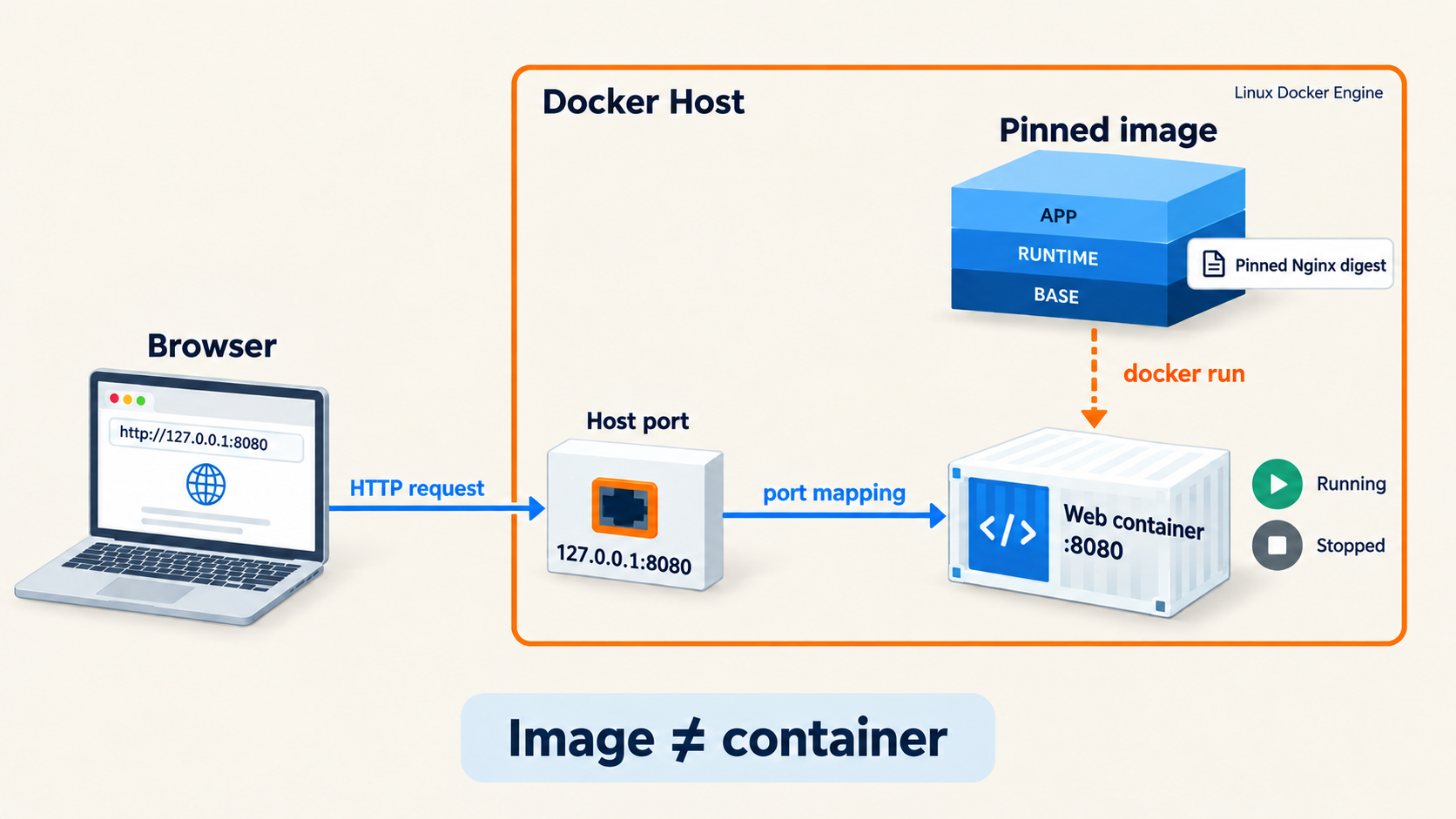
Start from a pinned web image. Run, inspect, stop and replace one instance. The image remains when its container is removed.
Target state / what this TD adds: A web container you can run, inspect and recreate.
What can you explain? Image → instance; host loopback :8080 → container :8080.
Inspect the canonical TD1 architecture
AFTER TD2
Your own application image
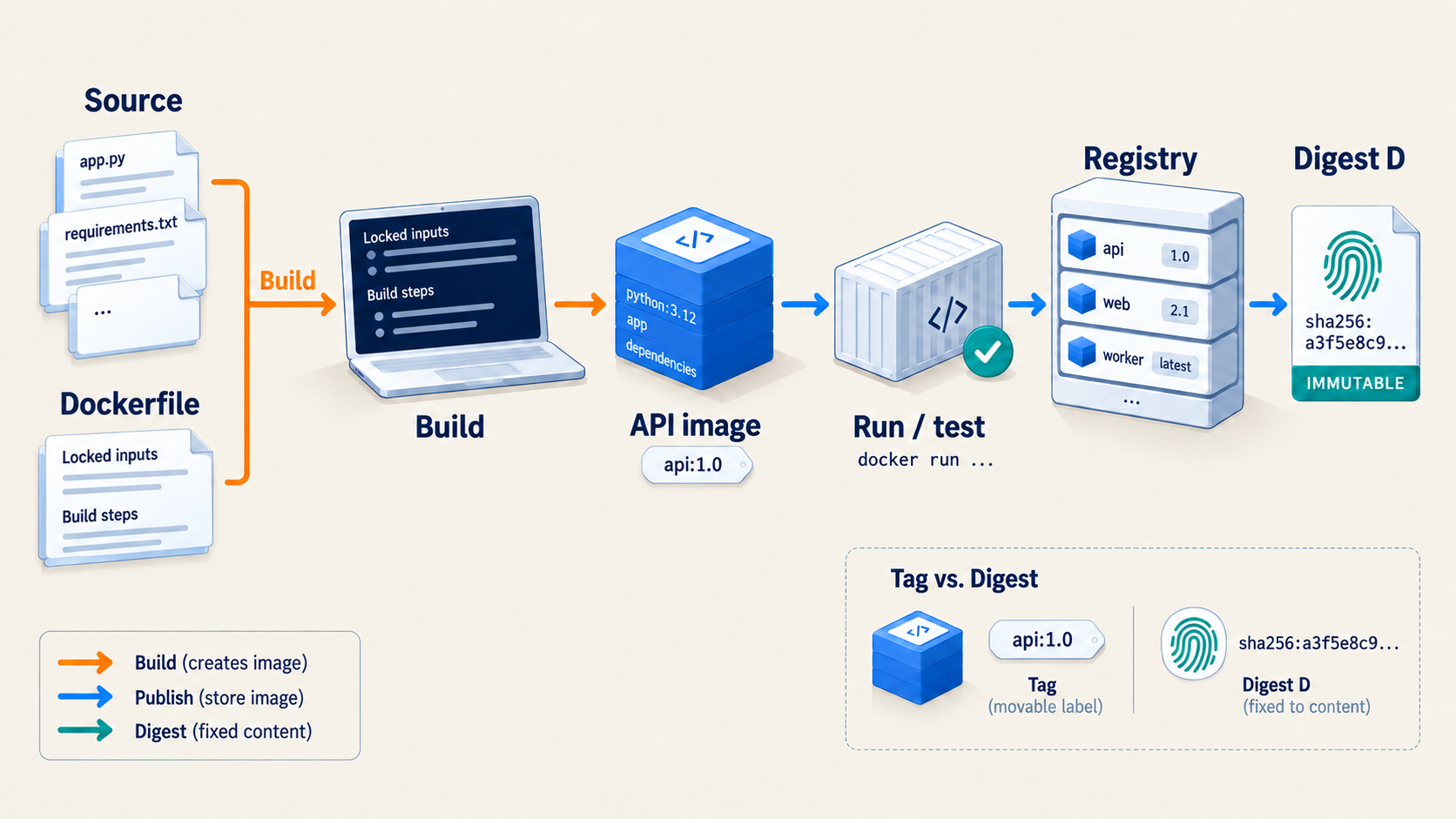
Replace the TD1 web example with the supplied API. Build it from source and record the published digest. This is a new image and container, on the same host.
Target state / what this TD adds: Our own reproducible API image, identified by digest.
What can you explain? Source + Dockerfile → build/test → API image → registry digest D.
Inspect the canonical TD2 architecture
AFTER TD3
Private, recoverable data
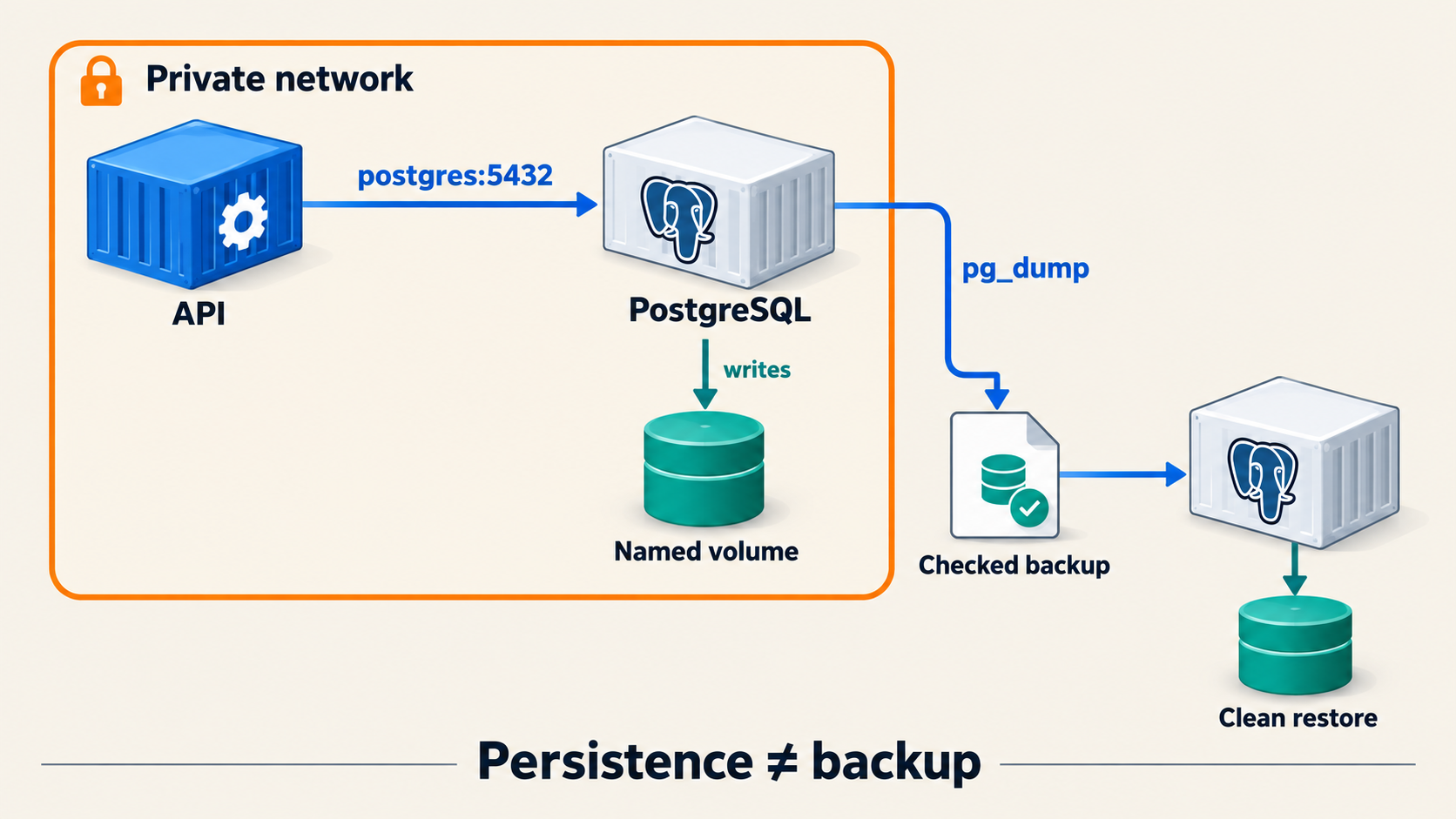
Connect the same API to PostgreSQL by service name. Keep both services off host ports. A named volume preserves data; an independent pg_dump backup is proved by a clean restore.
Target state / what this TD adds: Private API-to-database connectivity and recoverable data.
What can you explain? API → postgres:5432; database → named volume. No browser publication.
Inspect the canonical TD3 architecture
AFTER TD4
One complete Compose system
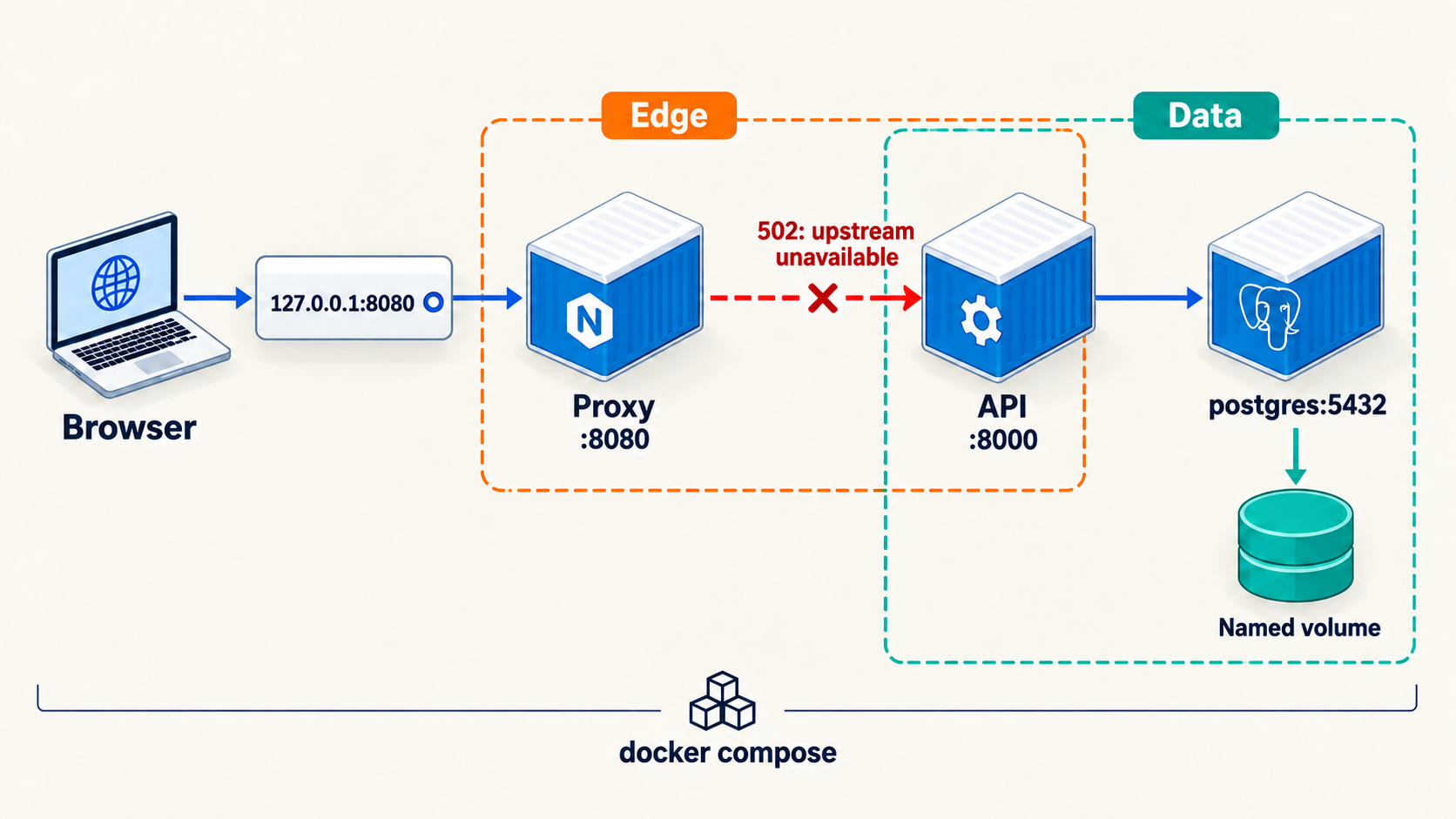
Adopt the existing data and secret volumes. Replace the ad-hoc network with edge and data networks. Publish only the proxy; trace one request before changing a failing hop.
Target state / what this TD adds: A complete Compose stack and a tested diagnosis.
What can you explain? Browser → loopback proxy → API on edge → PostgreSQL on data.
Inspect the canonical TD4 architecture
AFTER TD5
Required behavior, less authority
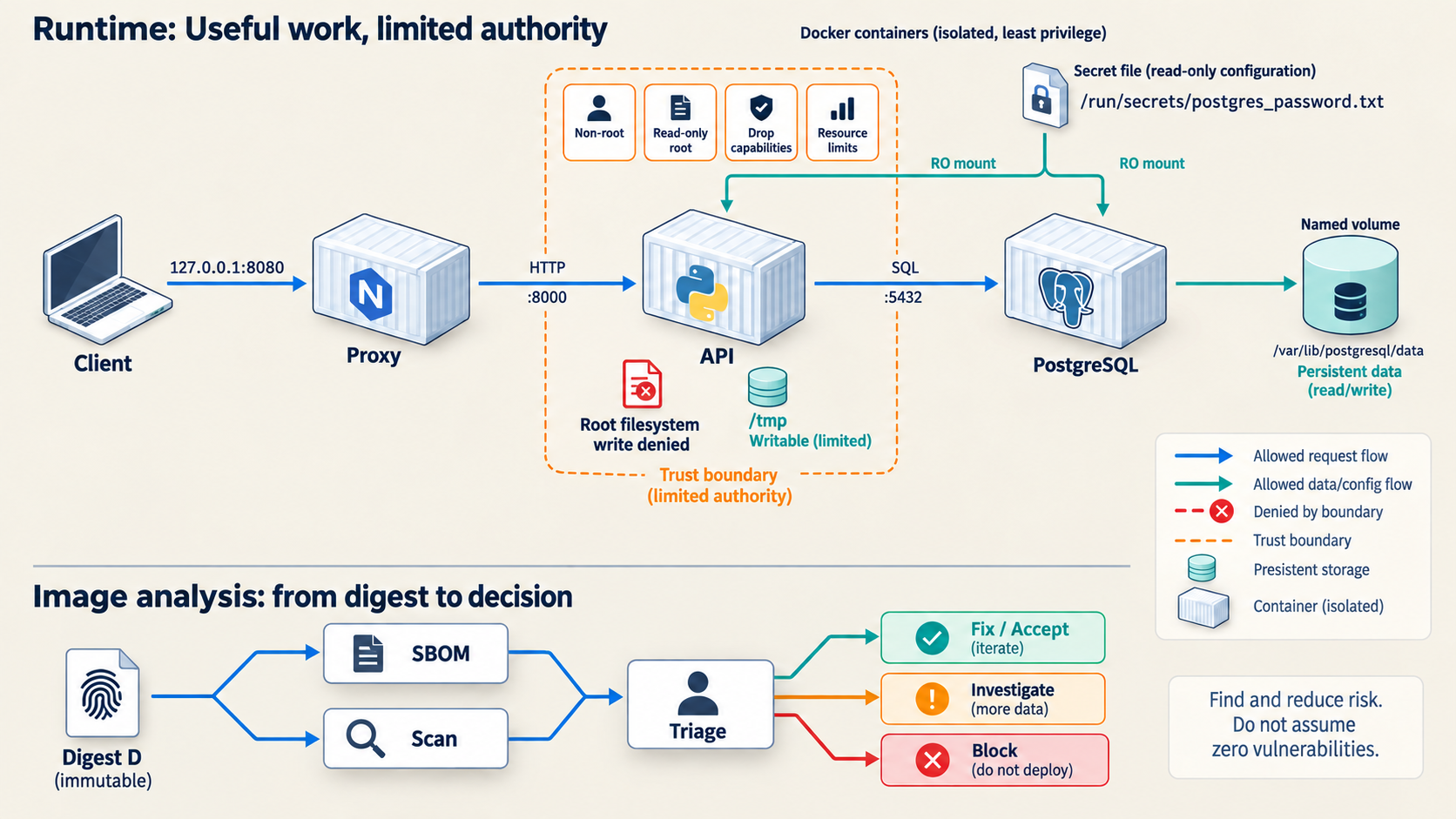
Harden this same stack. Preserve database writes and narrow temporary writes. Connect the exact image digest to its SBOM, scan findings and human triage.
Target state / what this TD adds: Least-privilege controls and reviewed supply-chain findings.
What can you explain? Service-specific controls; permitted work still succeeds, forbidden work is denied.
Inspect the canonical TD5 architecture
AFTER TD6
An exact release with a way back
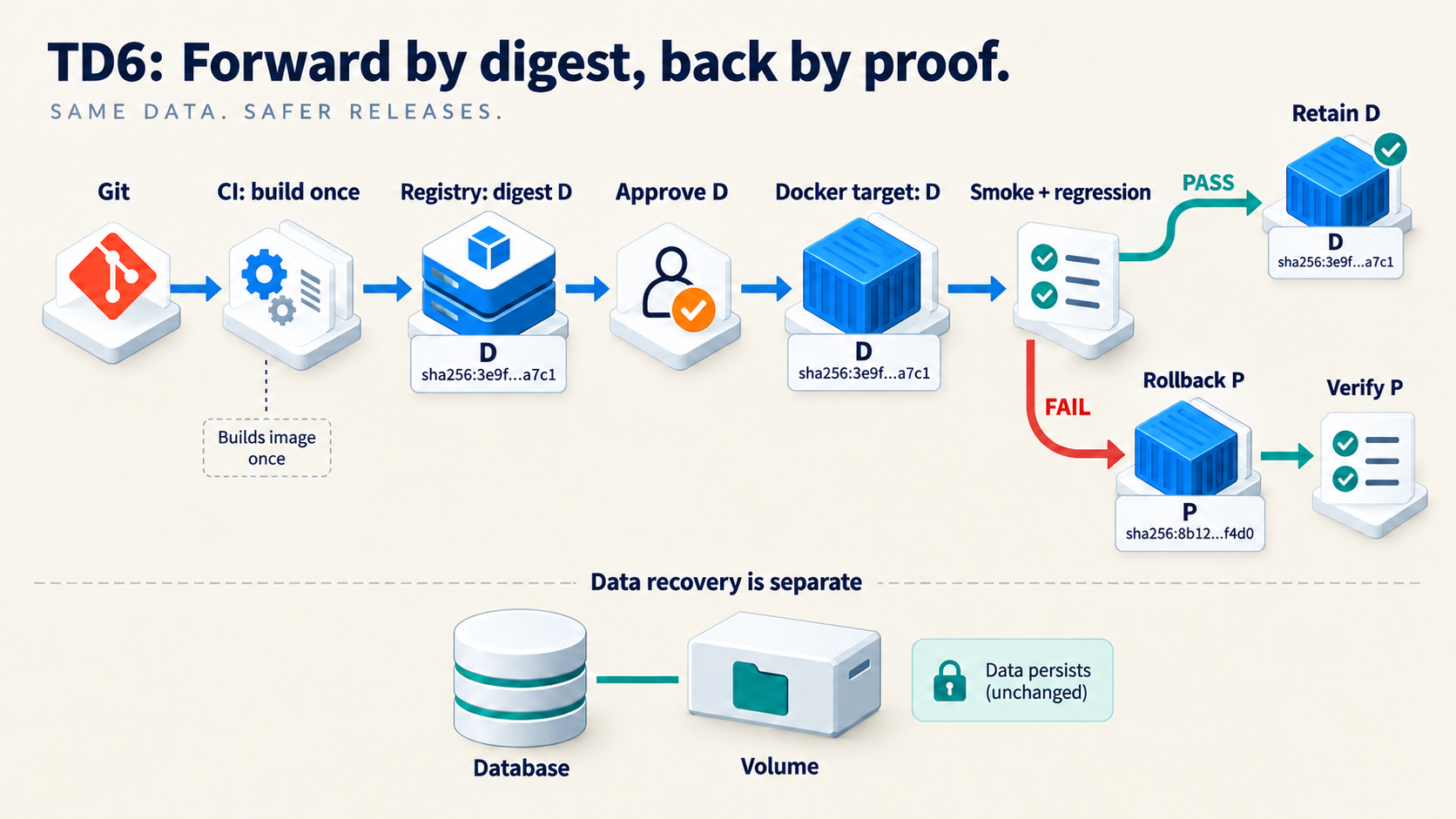
CI builds once. A human approves digest D. The target pulls D and runs smoke/regression checks. A failure restores and verifies previous known-good P.
Target state / what this TD adds: An immutable release, smoke tests and a known-good way back.
What can you explain? Image rollback is separate from database recovery.
Inspect the canonical TD6 architecture
30 NOV → 4 DEC 2026
Explain, diagnose, recover
Defend this same integrated project during 30 November–4 December 2026. Trace a claim to your own definition, test, observation and limitation.
Target state / what this TD adds: An immutable release, smoke tests and a known-good way back.
What can you explain? 8–10 minutes per student. TD1–5 40% · final project 50% · individual defense 10%.
Inspect the canonical TD6 architecture
The same application.
Your own explanation.
Integrate your lab work; demonstrate a bounded failure and recovery. The published format remains 8–10 minutes per student. No separate submission deadline is implied.
Build and explain your own implementation. Your own running system, diagnosis, modifications and individual explanation demonstrate understanding. Grading remains TD1–5 40% · final project 50% · individual defense 10%.
Full system checklist
Show a working proxy → API → PostgreSQL path; private database; surviving data; verified restore; a diagnosed failure; permitted and denied hardening tests; exact active digest and previous known-good target.
Demo rehearsal
- Trace the request and name the host running Docker.
- Show health, readiness, version and one CRUD marker.
- Explain one controlled fault and replay its correction.
- Identify D and P; demonstrate the documented rollback safely.
- Explain what rollback does not restore in the database.
Defense questions
- How do source revision, image ID, tag and registry digest differ?
- Whose localhost is used at each hop?
- Who owns persistent state, and how did you prove recovery?
- Which observation isolated your Compose fault?
- Which security control denies a forbidden action? What risk remains?
- What is running now, and which exact digest is your rollback target?