Execution guidance
Type in your project folder on your laptop. Open its local browser. Docker Desktop uses a local Linux VM; no SSH is needed.
Execution guidance
After SSH, your shell is on the server. Use the laptop’s SSH tunnel to reach the server’s loopback service. Same lab, different host.
Reference evidence boundary
A sanitized engineering walkthrough, not a live connection. Historical TD1/TD2 local observations; registry and TD3–TD6 Hades replay remain unexecuted.
TD04 · My Laptop
01 / WHERE AM I?
TD4 — Operate the complete application with Compose
Duration: 180 minutes. Assessment: TD4 contributes 8 course points.
Where are we in the project?
TD3 ran the API and PostgreSQL on a private network and proved data recovery. Today Compose adds the proxy and operates the same API image, secret and persistent data as one three-service application.
This stage adds: A complete Compose stack and a tested diagnosis.
TD04 · My Laptop
02 / TODAY'S MISSION
Today's mission
Run the complete Compose stack, reproduce the course's wrong-upstream 502 fault, capture evidence before repair, correct the proxy port, and replay the exact request and data checks.
TD04 · My Laptop
03 / FINAL ARCHITECTURE IMAGE
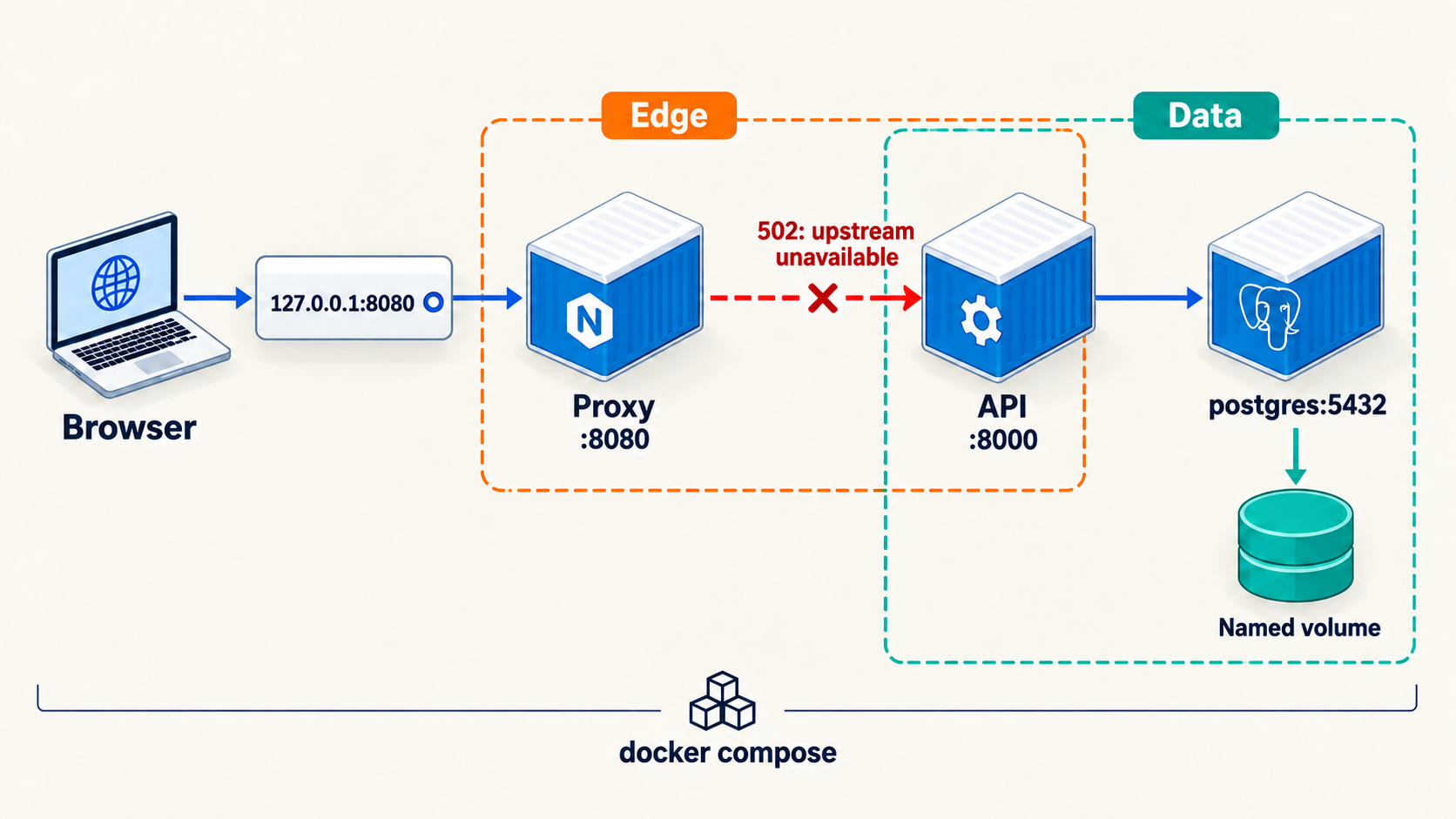
TD04 · My Laptop
04 / MY ENVIRONMENT
Before you start
Before you start
Work in your private project repository based on the student starter. Continue with the exact API digest and labelled data and secret volumes you established in TD3. Keep the same Docker host and project name. Do not remove either volume. Save incident evidence before changing a failed service.
My Laptop: Run commands in local Bash and open http://127.0.0.1:8080/. My Own Cloud: SSH to your Ubuntu server and run the same commands there. From a second laptop terminal, use an SSH local forward to server loopback, then browse on your laptop. Keep the proxy bound to the server loopback; do not publish the API or database.
Keep this terminal open because later commands use variables set earlier. If you reconnect, reload your non-secret environment file and recover saved values from evidence before continuing.
Type in your local Bash terminal. Docker runs on your laptop or inside Docker Desktop’s Linux VM. Open browser checks on your laptop.
After SSH, type Docker commands in your own Ubuntu server’s terminal. For browser checks, use a separate laptop terminal for the SSH tunnel. The server’s localhost and your laptop’s localhost are different.
Engineer Mode is Badr’s sanitized Hades reference. Students do not log in to Hades. Use your own laptop or server for the lab commands.
TD04 · My Laptop
05 / STEP-BY-STEP WORK
05 / STEP-BY-STEP WORK
Do the work, one step at a time.
Follow the commands in order. Keep the same terminal open so values from earlier steps remain available.
Step 1 — Turn the TD3 runtime into one Compose model · 45 minutes
Why: Compose records the three-service application in one versioned model. Inspect the architecture target and create your own compose.yaml and nginx/nginx.conf. The proxy alone publishes 127.0.0.1:8080; the API and PostgreSQL use private service communication, and the TD3 data and secret volumes remain attached. Keep the password value out of YAML and Git.
Before removing TD3 containers, inspect their course labels and confirm the named volumes belong to this project. Stop and remove only the old API and PostgreSQL containers, then the old TD3 network. Do not delete volumes. If a name or label differs, stop and ask for help rather than attaching unknown data.
mkdir -p evidence/TD04
docker volume ls
docker inspect delivery-api postgres --format '{{.Name}} {{json .Config.Labels}}'
docker network inspect td03-private --format '{{json .Labels}}'
docker compose -p docker-delivery config --quiet
docker compose -p docker-delivery config > evidence/TD04/resolved-compose.yaml
Check the resolved model: three services, one loopback host publication, and the two preserved named volumes. Use the setup page if you need to check which terminal runs Docker.
Step 2 — Validate, start and record known-good behavior · 35 minutes
Start the model using the API digest already recorded in your non-secret release.env. Save a versioned known-good definition before introducing the fault.
docker compose -p docker-delivery config --quiet
git add compose.yaml nginx/nginx.conf
git diff --cached --check
git commit -m 'td4: define Compose stack'
git rev-parse HEAD | tee evidence/TD04/known-good-sha.txt
docker compose -p docker-delivery up --detach --no-build --wait --wait-timeout 120
docker compose -p docker-delivery ps | tee evidence/TD04/ps-healthy.txt
curl --fail --silent --show-error http://127.0.0.1:8080/healthz
curl --fail --silent --show-error http://127.0.0.1:8080/readyz
curl --fail --silent --show-error http://127.0.0.1:8080/version
Check the API image identity with docker inspect, confirm the TD3 database marker is still present, and save bounded proxy/API logs. If baseline requests fail, diagnose them before the incident exercise. A running container alone does not prove readiness.
Step 3 — Reproduce and diagnose the supplied proxy incident · 45 minutes
Why: A 502 at the browser is a symptom. The first evidence should distinguish a proxy-to-API problem from an API or database failure. Ask your partner or Badr to introduce one reversible proxy-to-API connection error in your own working nginx/nginx.conf, without changing ports exposed on the host, credentials or data. They keep the cause private until your debrief. Save the known-good Git revision first. When working alone, use a genuine observed proxy failure; if none is available, mark the incident exercise pending rather than invent evidence. Keep the failed configuration and compare it with your known-good version during diagnosis.
docker compose -p docker-delivery up --detach --no-build --no-deps --force-recreate proxy
date -u +%FT%TZ | tee evidence/TD04/incident-start.txt
curl --silent --max-time 5 --output evidence/TD04/incident-body.txt --write-out '%{http_code}
' http://127.0.0.1:8080/healthz | tee evidence/TD04/incident-status.txt
docker compose -p docker-delivery ps --all | tee evidence/TD04/incident-ps.txt
docker compose -p docker-delivery logs --no-color --tail 80 proxy > evidence/TD04/incident-proxy-logs.txt 2>&1
docker compose -p docker-delivery logs --no-color --tail 40 delivery-api > evidence/TD04/incident-api-logs.txt 2>&1
git diff -- nginx/nginx.conf | tee evidence/TD04/proxy-diff.txt
Before any repair, check the API internally and check PostgreSQL readiness. Compare their results with the proxy request and log. Write down your hypothesis, evidence for it, and one alternative you ruled out. Keep the original failure outputs even after recovery.
Step 4 — Repair the smallest justified part and replay · 35 minutes
Use the saved proxy log, internal checks and config difference to decide which definition must change. Edit that file yourself, explain the line you changed, and recreate only the affected service. Keep API, database and named volumes in place.
docker compose -p docker-delivery config --quiet
docker compose -p docker-delivery up --detach --no-build --no-deps --force-recreate --wait --wait-timeout 120 proxy
curl --silent --show-error --max-time 5 --output evidence/TD04/repaired-body.json --write-out '%{http_code}
' http://127.0.0.1:8080/healthz | tee evidence/TD04/repaired-status.txt
curl --fail --silent --show-error http://127.0.0.1:8080/readyz | tee evidence/TD04/repaired-ready.json
curl --fail --silent --show-error http://127.0.0.1:8080/version | tee evidence/TD04/repaired-version.json
docker compose -p docker-delivery port proxy 8080 | tee evidence/TD04/proxy-port.txt
Run the supplied smoke check and your own persistence regression check. Implement the marked regression.sh task using TD3's saved item and replacement observations before claiming it passes. Confirm the same API digest, TD3 marker and loopback-only publication remain after repair. If replay fails, retain both before/after logs and inspect the proxy definition and network membership.
Step 5 — Explain the incident and finish the checkpoint · 20 minutes
Write evidence/TD04/OBSERVATIONS.md yourself. Include the first UTC observation, known-good definition SHA, API digest, failed request, internal API and database observations, competing hypotheses, the one cause supported by evidence, your smallest repair, the same request after repair, and what this exercise did not test. Reference your saved evidence filenames. Do not fill in an expected conclusion if your observed outputs disagree.
docker compose -p docker-delivery ps | tee evidence/TD04/ps-final.txt
git diff --check
test -s evidence/TD04/OBSERVATIONS.md
Next, keep this same application and its data for TD5.
TD04 · My Laptop
06 / LIVE CHECKPOINT
Run the source checks in your terminal, then compare your observations. Browser markers are your own record, not a verification result.
Check it
- The resolved Compose model has proxy, API and PostgreSQL, with only proxy published to host loopback.
- The API uses your recorded immutable digest and the TD3 marker survives.
- Evidence captures the failed proxy request, service state, bounded logs, internal API and database checks before repair.
- After your one-service repair, the same request succeeds and smoke plus persistence regression pass.
- Your incident record names the observed cause, evidence, repair and recovery limit in your own words.
docker compose -p docker-delivery config --quiet
test -s evidence/TD04/incident-proxy-logs.txt
test -s evidence/TD04/OBSERVATIONS.md
docker compose -p docker-delivery port proxy 8080
Use the Help section for a failing observation. Do not erase the first failure.
TD04 · My Laptop
07 / WHAT CHANGED IN MY PROJECT
What did we add to the project?
Before: TD3 had a private API and recoverable PostgreSQL state. This TD added: a loopback proxy, Compose service dependencies, health checks and one evidence-led repair. After: The three-service stack serves requests and keeps the TD3 data. Next: TD5 reduces privileges and checks the same release's supply chain.
See the evolving project architecture ↗TD04 · My Laptop
08 / ENGINEER MODE
REAL VPS CONTEXT / NO STUDENT ACCESS TO HADES. See how this concept looks on a real VPS; perform and justify the assessed work on your own machine.
Engineer Mode
On a real VPS, the Docker commands run after SSH on that host; the browser uses an SSH tunnel to reach the proxy bound to host loopback. A proxy 502 can coexist with a healthy API process. Save the first request and bounded logs before changing a service, then compare the repeated request after one justified repair. Hades is Badr's reference host; students use their own laptop or server.
TD04 · My Laptop
09 / HELP
I'm stuck
If Compose configuration fails, inspect the reported line and rerun config before starting containers. If the proxy returns 502, save proxy logs and service state, then test the API from inside its container and check database readiness. Compare the failed hop with your own proxy definition and known-good revision; change only the part supported by evidence. If internal readiness also fails, investigate API, database and secret access. If host port 8080 is busy, identify its owner with docker ps before removing anything. Never share a secret or database dump.