Execution guidance
Type in your project folder on your laptop. Open its local browser. Docker Desktop uses a local Linux VM; no SSH is needed.
Execution guidance
After SSH, your shell is on the server. Use the laptop’s SSH tunnel to reach the server’s loopback service. Same lab, different host.
Reference evidence boundary
A sanitized engineering walkthrough, not a live connection. Historical TD1/TD2 local observations; registry and TD3–TD6 Hades replay remain unexecuted.
TD05 · My Laptop
01 / WHERE AM I?
TD5 — Harden and inspect the same application
Duration: 180 minutes. Assessment: TD5 contributes 8 course points.
Where are we in the project?
TD4 gave us a working proxy → API → PostgreSQL stack, a private database network, a persistent volume, and a known-good API digest. TD5 keeps that stack and digest while reducing what each process can do and recording the software inside the image. TD6 will release the next digest.
This stage adds: Least-privilege controls and reviewed supply-chain findings.
TD05 · My Laptop
02 / TODAY'S MISSION
Today's mission
Harden the same working application, prove allowed requests still work and a forbidden root-filesystem write fails for the intended reason, then produce an SBOM and vulnerability scan for the exact running API digest. Create and justify your own controls and a bounded risk decision. Keep the database's required writable data path.
TD05 · My Laptop
03 / FINAL ARCHITECTURE IMAGE
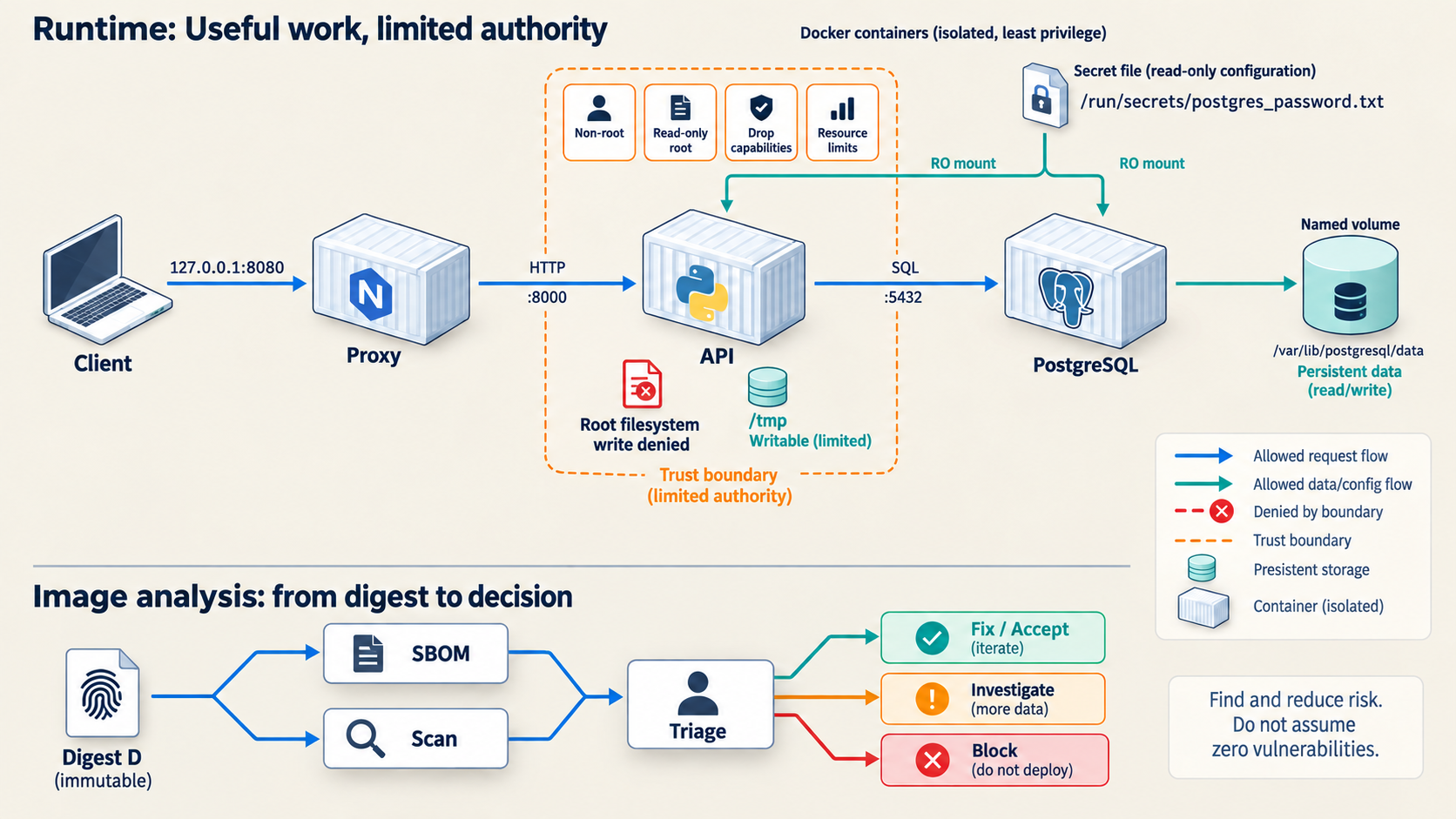
TD05 · My Laptop
04 / MY ENVIRONMENT
Before you start
Before you start
Work in your private project repository based on the student starter, where compose.yaml and scripts/ sit together. Keep the TD4 data and secret volumes and use the same Docker host. My Laptop: run Bash locally or in Ubuntu WSL with Docker Desktop integration. My Own Cloud: SSH to your Ubuntu host and run the same work there; use a laptop SSH tunnel to view the loopback proxy. Hades is an engineering example, not a student login.
First confirm TD4 smoke and persistence checks pass. Your non-secret release.env must name a real ghcr.io image digest. If your scanner or platform prerequisite is unavailable, record BLOCKED with the failed command and reason. Never mount the Docker socket, host root, devices or host namespaces into an application or scanner container. Keep secrets out of command output and Git.
The starter operational scripts stop with exit 64 until you implement their marked tasks. Complete your regression and runtime-contract checks from the published lab requirements; they must fail on a mismatched identity or a broken required behavior. A supplied stub is not an executed check.
Type in your local Bash terminal. Docker runs on your laptop or inside Docker Desktop’s Linux VM. Open browser checks on your laptop.
After SSH, type Docker commands in your own Ubuntu server’s terminal. For browser checks, use a separate laptop terminal for the SSH tunnel. The server’s localhost and your laptop’s localhost are different.
Engineer Mode is Badr’s sanitized Hades reference. Students do not log in to Hades. Use your own laptop or server for the lab commands.
TD05 · My Laptop
05 / STEP-BY-STEP WORK
05 / STEP-BY-STEP WORK
Do the work, one step at a time.
Follow the commands in order. Keep the same terminal open so values from earlier steps remain available.
Step 1 — Name the threat and exact artifact · 30 minutes
Why: A security control needs an abuse case and a test. A scanner count alone is not a security decision.
Run this from your project root:
set -euo pipefail
. scripts/course-env.sh
set -a; . ./release.env; set +a
case "$DELIVERY_API_IMAGE" in ghcr.io/*@sha256:*) ;; *) echo 'BLOCKED: exact GHCR digest required'; exit 1;; esac
mkdir -p evidence/TD05
printf 'captured_at_utc=%s\nimage=%s\n' "$(date -u +%FT%TZ)" "$DELIVERY_API_IMAGE" > evidence/TD05/image-under-review.txt
docker compose -p docker-delivery ps | tee evidence/TD05/before-ps.txt
bash scripts/smoke.sh | tee evidence/TD05/before-smoke.txt
bash scripts/regression.sh | tee evidence/TD05/before-regression.txt
Write evidence/TD05/THREAT_MODEL.md. For each asset, identify an attacker path, likely abuse, a specific control and a test that could disprove your claim. Cover the Docker daemon, database network, password file, API/proxy filesystem, image identity and one runtime dependency. For one non-assessed example: a public documentation page should have an owner and review date; test that the link still resolves. Add your actual host observations and justify at least one tradeoff.
Expected and verify: Baseline smoke and persistence regression pass, and the scanned image coordinate matches the running container. If they differ, stop before scanning.
Step 2 — Produce an SBOM and scan without a daemon socket · 30 minutes
Why: The SBOM and findings must describe exactly the immutable image from Step 1. Trivy receives a read-only exported image tar, never the daemon socket.
scan_dir="$(mktemp -d)"
trap 'rm -f -- "$scan_dir/api.tar"; rmdir -- "$scan_dir"' EXIT
docker image save --output "$scan_dir/api.tar" "$DELIVERY_API_IMAGE"
test -s "$scan_dir/api.tar"
docker run --rm --platform "$COURSE_IMAGE_PLATFORM" \
  --mount "type=bind,source=$scan_dir,target=/scan,readonly" \
  "$TRIVY_IMAGE" image --input /scan/api.tar --format cyclonedx \
  > evidence/TD05/sbom.cdx.json
docker run --rm --platform "$COURSE_IMAGE_PLATFORM" \
  --mount "type=bind,source=$scan_dir,target=/scan,readonly" \
  "$TRIVY_IMAGE" image --input /scan/api.tar --scanners vuln --format json \
  > evidence/TD05/vulnerabilities.json
python3 -m json.tool evidence/TD05/sbom.cdx.json >/dev/null
python3 -m json.tool evidence/TD05/vulnerabilities.json >/dev/null
printf '%s\n' "$DELIVERY_API_IMAGE" > evidence/TD05/scanned-digest.txt
sha256sum evidence/TD05/sbom.cdx.json evidence/TD05/vulnerabilities.json \
  > evidence/TD05/scanner-artifacts.sha256
rm -f -- "$scan_dir/api.tar"
rmdir -- "$scan_dir"
trap - EXIT
The scanner may download or refresh its vulnerability database. Record scanner image version, UTC time, database/update status shown in stderr, and any offline or update failure. A JSON parse alone does not prove database freshness. Keep the unfiltered JSON for review; TD6's release gate applies its own CRITICAL,HIGH and fixed-vulnerability policy. Do not silently reinterpret that filtered CI file as a complete inventory.
Expected and verify: Both JSON files are nonempty and parse; scanned-digest.txt equals the Step 1 digest; sha256sum -c evidence/TD05/scanner-artifacts.sha256 passes. Inspect sbom.cdx.json for bomFormat: CycloneDX and a components array. Finding counts vary with the actual image and database. Record what you saw, never a prewritten PASS or CVE count.
If it fails: Record BLOCKED: scan/database unavailable and the exact scanner error. Correct network/cache availability or rerun the pinned scanner. Do not mount /var/run/docker.sock to work around the failure.
Step 3 — Build your hardening and test the permitted path · 45 minutes
Why: Least privilege matters only when the real API, proxy and database path still works. Edit your own Dockerfile, compose.yaml and Nginx definition. Run the API as a non-root identity, drop unneeded capabilities, prevent privilege gain, make API/proxy roots read-only with only narrow writable temporary paths, and bound resources. Keep the proxy loopback-only and API/database private. PostgreSQL requires its writable named data volume and a documented runtime exception. Mount the password file read-only and give only the processes that need it read access; do not put its value in YAML, environment, image history or evidence.
docker compose -p docker-delivery config --quiet
git diff --check
docker compose -p docker-delivery up --detach --no-build --force-recreate --wait --wait-timeout 120
bash scripts/smoke.sh | tee evidence/TD05/smoke-hardened.txt
bash scripts/regression.sh | tee evidence/TD05/regression-hardened.txt
docker compose -p docker-delivery ps | tee evidence/TD05/hardened-ps.txt
Check healthz, readyz, version, persistence and publication. On your own cloud host, keep the provider firewall closed to application and database ports and use the SSH tunnel for browser access. If a service fails, inspect its bounded logs and the specific permission error; do not switch to root or use chmod 777 as a blanket repair.
Step 4 — Prove a forbidden action fails for the intended reason · 25 minutes
Why: Pair allowed behavior with a denied action, then inspect the control that caused the denial.
api_id="$(docker compose -p docker-delivery ps -q delivery-api)"
proxy_id="$(docker compose -p docker-delivery ps -q proxy)"
postgres_id="$(docker compose -p docker-delivery ps -q postgres)"
for id in "$api_id" "$proxy_id" "$postgres_id"; do
  docker inspect --format 'name={{.Name}} user={{.Config.User}} readonly={{.HostConfig.ReadonlyRootfs}} capdrop={{json .HostConfig.CapDrop}} security={{json .HostConfig.SecurityOpt}} mounts={{json .Mounts}}' "$id"
done | tee evidence/TD05/runtime-controls.txt
docker exec "$api_id" sh -c 'id; grep -E "^(CapEff|NoNewPrivs):" /proc/1/status; test -r /run/secrets/postgres_password.txt' \
  | tee evidence/TD05/api-identity.txt
docker exec "$proxy_id" sh -c 'id; grep -E "^(CapEff|NoNewPrivs):" /proc/1/status' \
  | tee evidence/TD05/proxy-identity.txt
docker top "$postgres_id" -eo user,pid,ppid,args | tee evidence/TD05/postgres-process.txt
set +e
docker exec --user 0 "$api_id" sh -c 'touch /app/td05-denied' > evidence/TD05/root-write-denied.txt 2>&1
write_status=$?
set -e
printf 'exit_code=%s\n' "$write_status" >> evidence/TD05/root-write-denied.txt
test "$write_status" -ne 0
test "$(docker inspect --format '{{.HostConfig.ReadonlyRootfs}}' "$api_id")" = true
bash scripts/smoke.sh | tee evidence/TD05/allowed-after-denial.txt
docker run --rm --platform "$COURSE_IMAGE_PLATFORM" --network none --read-only \
  --user "$(id -u):$(id -g)" --group-add 20001 --cap-drop ALL \
  --mount type=volume,source=docker-delivery_course-secret,target=/run/secrets,readonly \
  --mount "type=bind,source=$PWD/evidence,target=/evidence,readonly" \
  "$PYTHON_IMAGE" python -c '
from pathlib import Path
secret = Path("/run/secrets/postgres_password.txt").read_bytes().strip()
if not secret:
    raise SystemExit("STOP: protected password file is empty")
leaks = [str(p.relative_to("/evidence")) for p in Path("/evidence").rglob("*")
         if p.is_file() and secret in p.read_bytes()]
if leaks:
    print("STOP: remove the password from these evidence files:", *leaks, sep="\n")
    raise SystemExit(1)
print("PASS: the current password value was not found in local evidence files")'
--user 0 is a one-off diagnostic: root must still receive a read-only file system error at /app. The running API process remains UID 10001. A generic “Permission denied” could be file ownership; it does not by itself prove a read-only mount. Check CapEff: 0000000000000000 and NoNewPrivs: 1 for API/proxy. The secret-file test checks readability only; never cat its value into evidence. Check the secret's name, not its value, with docker inspect ... .Config.Env if investigating a leak.
Expected and verify: Denied touch has a nonzero exit code and the read-only reason; API/proxy roots are read-only with ALL dropped; ordinary endpoint tests still pass. PostgreSQL's steady-state server process is non-root, with its data path writable.
If it fails: Preserve outputs, inspect the observed mount and process identity, then fix the owned definition and replay both allowed and denied tests. Do not report a denial caused only by an unrelated missing file or wrong path.
Step 5 — Triage, verify recovery and save · 50 minutes
Why: A scan is an input to a decision. A security claim must include its limits and show that recovery is still possible.
Create evidence/TD05/TRIAGE.md. For each High/Critical finding in your observed scan, record component/version, fix version or no fix, whether this workload reaches it, attacker path, disposition (rebuild/mitigate/time-bounded accept), owner, review date and residual risk. If there are no High/Critical findings, pick two Medium findings; if there are none, choose two significant SBOM components and explain why no selected CVE appeared. A representative decision is: if a vulnerable package has a fix and is reachable on the API request path, rebuild on a fixed pinned base, scan the new digest, and rerun tests before promotion. If no fix exists and the component is unreachable under this architecture, a dated, evidence-backed exception can be considered. Neither decision asserts that a specific CVE exists in your scan.
Replay the known-good TD4 definition from the recorded SHA, then return to your current definition. Compare the saved known-good definition with your hardened definition and explain any difference. This tests definition replay, not an image rollback. TD6 performs the actual digest rollback. Do not remove named data or secret volumes.
known_good_sha="$(cat evidence/TD04/known-good-sha.txt)"
test -n "$known_good_sha"
rollback_dir="$(mktemp -d)"
rmdir "$rollback_dir"
git worktree add --detach "$rollback_dir" "$known_good_sha"
docker compose -p docker-delivery -f "$rollback_dir/compose.yaml" config --quiet
docker compose -p docker-delivery -f "$rollback_dir/compose.yaml" up \
  --detach --no-build --force-recreate --wait --wait-timeout 120
bash scripts/smoke.sh | tee evidence/TD05/known-good-smoke.txt
docker compose -p docker-delivery up \
  --detach --no-build --force-recreate --wait --wait-timeout 120
bash scripts/smoke.sh | tee evidence/TD05/returned-hardened-smoke.txt
bash scripts/regression.sh | tee evidence/TD05/returned-hardened-regression.txt
git worktree remove "$rollback_dir"
Write evidence/TD05/OBSERVATIONS.md with the actual UTC time, Docker version, scanned/running digest, scanner database status, SBOM/scan hashes, one triage decision and expiry, API/proxy controls, allowed and denied outputs with exit codes, recovery outputs, and one remaining limitation. Use BLOCKED for any step not run. For a rootful Docker host, daemon-level authority remains a residual risk. Verify sha256sum -c evidence/TD05/scanner-artifacts.sha256 after copying evidence.
Expected and verify: The hardened definition is active again; smoke and persistence regression pass. git status --short shows only your intended files. A new base image or rebuild produces a new digest and requires a new scan and approval.
If it fails: Keep the last known-good coordinate and failure output. Restore the original definition and diagnose before claiming completion. Do not delete PostgreSQL data.
TD05 · My Laptop
06 / LIVE CHECKPOINT
Run the source checks in your terminal, then compare your observations. Browser markers are your own record, not a verification result.
Check it
Run these checks on the same Docker host after Step 5. They make real requests and inspect the current stack; the JSON checks also verify the saved scan artifacts.
set -euo pipefail
. scripts/course-env.sh
set -a; . ./release.env; set +a
api_id="$(docker compose -p docker-delivery ps -q delivery-api)"
proxy_id="$(docker compose -p docker-delivery ps -q proxy)"
test "$(docker inspect --format '{{.Config.Image}}' "$api_id")" = "$(cat evidence/TD05/scanned-digest.txt)"
bash scripts/smoke.sh
bash scripts/regression.sh
bash scripts/verify_runtime_contract.sh
for container in "$api_id" "$proxy_id"; do
  # regression recreated the API: resolve its current ID again.
  if test "$container" = "$api_id"; then container="$(docker compose -p docker-delivery ps -q delivery-api)"; fi
  test "$(docker inspect --format '{{.HostConfig.ReadonlyRootfs}}' "$container")" = true
  docker inspect --format '{{json .HostConfig.CapDrop}}' "$container" | grep -q 'ALL'
done
api_id="$(docker compose -p docker-delivery ps -q delivery-api)"
test "$(docker exec "$api_id" id -u)" = 10001
docker exec "$api_id" test -r /run/secrets/postgres_password.txt
if docker exec --user 0 "$api_id" touch /app/td05-checkpoint-denied; then
  echo 'FAIL: forbidden write succeeded'; exit 1
fi
sha256sum --check evidence/TD05/scanner-artifacts.sha256
python3 - <<'CHECK'
import json
from pathlib import Path
p=Path('evidence/TD05')
sbom=json.loads((p/'sbom.cdx.json').read_text())
assert sbom['bomFormat']=='CycloneDX' and isinstance(sbom['components'],list)
assert isinstance(json.loads((p/'vulnerabilities.json').read_text()),dict)
assert (p/'TRIAGE.md').stat().st_size
CHECK
printf 'PASS: allowed behavior, denied write and saved scan checks agree\n'
Expected: positive checks pass; the denied write prints a read-only-filesystem error. Missing or stale scanner context is still BLOCKED, even if JSON parses. Step 4 contains the exact no-disclosure evidence scan; rerun it before sharing evidence.
TD05 · My Laptop
07 / WHAT CHANGED IN MY PROJECT
What did we add to the project?
Before: a working Compose stack and known-good definition. This TD added: tested least-privilege controls and digest-linked SBOM, scan and triage. After: the same healthy application with allowed and denied actions verified. Next: TD6 releases an exact digest and tests the path back.
See the evolving project architecture ↗TD05 · My Laptop
08 / ENGINEER MODE
REAL VPS CONTEXT / NO STUDENT ACCESS TO HADES. See how this concept looks on a real VPS; perform and justify the assessed work on your own machine.
Engineer Mode
A real VPS changes where commands run and where evidence is stored; it does not change the threat model. Inspect the active image digest, effective container user, mounts and capabilities, then compare a permitted request with a denied write. A scanner result needs its image digest, database context, time and human triage. PostgreSQL still needs a writable data volume. Hades is an observational reference; no current Hades scan result is asserted.
TD05 · My Laptop
09 / HELP
I'm stuck
| Symptom | First check and correction | Verify again |
|---|---|---|
| Trivy cannot update database | Save stderr; check scanner network/cache, rerun the pinned command | JSON validity and recorded update status |
| API cannot read secret | Inspect file mode/group and the group_add/secret mount; provision the file through the course setup path |
docker exec "$api_id" test -r /run/secrets/postgres_password.txt |
| Proxy fails with read-only root | Inspect docker compose logs --tail=80 proxy; use the supplied /tmp Nginx paths |
docker compose ... up --wait and smoke |
| Denied write says only permission denied | Check root override, /app mount and ReadonlyRootfs; replay the diagnostic |
Explicit read-only error and allowed smoke |
Share only the command, redacted error, and My Laptop or My Own Cloud. Never share a password, token, private key or raw database dump.
Assessment details
Assessment checklist (100 raw points; TD05 contributes 8 course points)
| Criterion | Core | Depth | Total | Core evidence |
|---|---|---|---|---|
| Threat model and prioritization | 16 | 4 | 20 | scoped assets/boundaries/capabilities, six abuse cases and testable mitigations |
| SBOM and vulnerability reasoning | 20 | 5 | 25 | digest linkage, valid artifacts, defensible triage and residual risk |
| Least-privilege definition | 24 | 6 | 30 | non-root, caps dropped, NNP, read-only, narrow mounts/networks/resources |
| Positive/negative verification and recovery | 20 | 5 | 25 | contract passes, controls deny, secrets clean, rollback and peer challenge |
| Total | 80 | 20 | 100 |
Any Docker-socket mount, privileged/host mode, host-root mount, public DB/API, embedded credential or fabricated scan is a core failure and is rejected before dynamic grading. Depth is zero for a criterion whose core gate fails.