Execution guidance
Type in your project folder on your laptop. Open its local browser. Docker Desktop uses a local Linux VM; no SSH is needed.
Execution guidance
After SSH, your shell is on the server. Use the laptop’s SSH tunnel to reach the server’s loopback service. Same lab, different host.
Reference evidence boundary
A sanitized engineering walkthrough, not a live connection. Historical TD1/TD2 local observations; registry and TD3–TD6 Hades replay remain unexecuted.
TD03 · My Laptop
01 / WHERE AM I?
TD3 — Connect the API to private, recoverable data
Duration: 180 minutes. Assessment: TD3 contributes 8 course points.
Where are we in the project?
TD2 gave our supplied API a published image digest. Today that same API gains a private PostgreSQL service, a file secret and data that survives container replacement. TD4 will put these same services behind a proxy; the final project keeps their names, image and data.
This stage adds: Private API-to-database connectivity and recoverable data.
TD03 · My Laptop
02 / TODAY'S MISSION
Today's mission
Connect the API to PostgreSQL at postgres:5432 on a private network. Create a real API item, replace the database container without losing that item, and restore a checked backup into a clean target.
TD03 · My Laptop
03 / FINAL ARCHITECTURE IMAGE
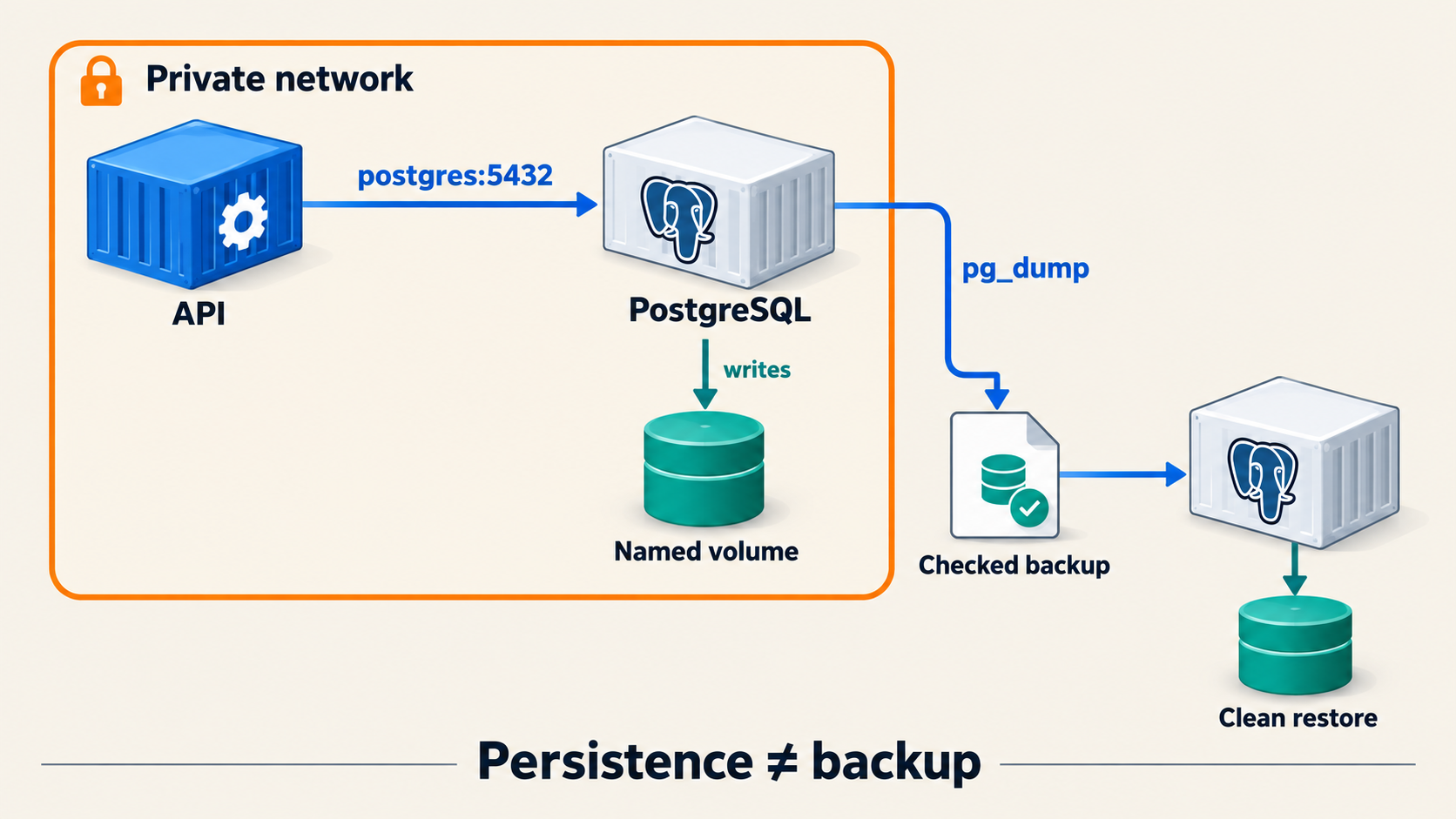
TD03 · My Laptop
04 / MY ENVIRONMENT
Before you start
Before you start
Continue in your copy of the supplied project starter, with the API image you built in TD2. release.env must contain the real GHCR @sha256: reference you observed; if publication is BLOCKED, record that limit and seek the course's approved alternative before claiming a completed TD3. Keep scripts/course-env.sh, the supplied application, SQL schema and course version locks in your project. Use synthetic demonstration data, Python 3 and a working Docker Engine. Create ignored secrets/ and backups/ folders with restricted permissions. Stop if a same-named container, network or volume belongs to other work.
My Laptop
Run Docker commands in your local Bash terminal. The API and PostgreSQL will stay on a private Docker network, with no host port for either service.
My Own Cloud
SSH to your own Ubuntu host and run the same work there. Docker network names and 127.0.0.1 refer to that host. The API and database remain unpublished; no browser tunnel is needed for these private checks.
Engineer Mode explains how the host boundary affects the same private-data design.
Type in your local Bash terminal. Docker runs on your laptop or inside Docker Desktop’s Linux VM. Open browser checks on your laptop.
After SSH, type Docker commands in your own Ubuntu server’s terminal. For browser checks, use a separate laptop terminal for the SSH tunnel. The server’s localhost and your laptop’s localhost are different.
Engineer Mode is Badr’s sanitized Hades reference. Students do not log in to Hades. Use your own laptop or server for the lab commands.
TD03 · My Laptop
05 / STEP-BY-STEP WORK
05 / STEP-BY-STEP WORK
Do the work, one step at a time.
Follow the commands in order. Keep the same terminal open so values from earlier steps remain available.
Step 1 — Prepare private resources and a file secret · 30 minutes
Load scripts/course-env.sh and your observed digest from release.env. Use service names delivery-api and postgres, network td03-private, and explicit course.lab=TD03 plus course.environment=course-lab labels so TD4 can identify your objects. Create that labelled private bridge network and two named volumes: one for PostgreSQL data and one for a password file. Before reusing any same-named object, inspect its labels and stop if it is not yours. Generate a strong random password into an ignored host file with mode 0600; never print it or commit it. Move it into the Docker-owned secret volume without displaying its value. Arrange ownership so the PostgreSQL process and the API's permitted group can read the file through read-only mounts. Check readability as those users, while keeping the password out of terminal output and evidence. A named volume survives container removal; a container writable layer does not.
Step 2 — Connect PostgreSQL and the API privately · 35 minutes
Create your own repeatable scripts/td03-run.sh using the pinned PostgreSQL image and your TD2 API digest. Put both services on the private bridge. Mount the persistent data volume and supplied SQL initialization file into PostgreSQL; mount the password volume read-only into both services and pass the password file path to each process. Configure the API to reach postgres:5432 by Docker DNS. Apply explicit memory, CPU and process limits. Do not publish either service to a host port. Start PostgreSQL, wait for its readiness, then start the API. From a temporary peer on the same network, request /readyz; use docker inspect to verify both host port bindings are absent. Keep actual outputs under evidence/TD03/.
Step 3 — Prove data survives container replacement · 25 minutes
Insert one synthetic row into PostgreSQL and create one synthetic item through the supplied API. Record the returned item ID and read both records back. Stop and remove only your labelled TD3 service containers, leaving the named data and secret volumes intact. Re-run your saved definition, wait for readiness, then query the same row and API item. Compare the before/after values and container IDs. Explain why a new container ID with retained records supports the persistence claim; a restarted container alone would not.
Step 4 — Make and test a backup on disposable data · 40 minutes
Use pg_dump to save a custom-format backup in ignored backups/. These checks inspect the archive without restoring into your working database:
test -s backups/td03.dump
docker exec -i postgres pg_restore --list < backups/td03.dump
sha256sum backups/td03.dump
Check that the file is nonempty, list its contents with pg_restore --list, and record a SHA-256 checksum. Start a separate labelled PostgreSQL restore container with a new disposable data volume, no network and no host port. Verify the checksum before restoring with pg_restore. Query the synthetic row and API item in that restored database; compare them with the original records. Confirm the working database remained available and unchanged. Only after the checks pass, remove the labelled disposable restore container and volume. Preserve the dump and error if any check fails; never run a broad volume cleanup.
Step 5 — Explain three distinct claims · 50 minutes
Write evidence/TD03/OBSERVATIONS.md in your own words. For private reachability, cite network membership, service-name DNS, /readyz and absent host bindings. For persistence, cite the same row and API item after replacing the containers. For recovery, cite the checked dump and matching records in the separate restore target, including elapsed restore time. State the limit: this backup proves recovery of the captured records, not later writes or a complete disaster recovery objective. Keep the password and dump out of Git and shared evidence. TD4 will place these services behind a proxy in Compose.
TD03 · My Laptop
06 / LIVE CHECKPOINT
Run the source checks in your terminal, then compare your observations. Browser markers are your own record, not a verification result.
Check it
Inspect both services' host port bindings; each should be absent:
docker inspect --format '{{json .HostConfig.PortBindings}}' postgres
docker inspect --format '{{json .HostConfig.PortBindings}}' delivery-api
Test service-name DNS and /readyz from a peer on the private network. Confirm that your synthetic SQL row and API item match before and after container replacement, then match the restored records on the disposable volume. Verify the backup checksum and archive listing, and show that the working PostgreSQL container was untouched by the restore test. Review evidence/TD03/OBSERVATIONS.md for a separate explanation of reachability, persistence and recovery. Review the saved network, persistence and restore outputs; each claim needs an observed command result.
TD03 · My Laptop
07 / WHAT CHANGED IN MY PROJECT
What did we add to the project?
Before: TD2's digest identified the API image, but no database state existed. This TD added: td03-private, postgres, a file secret, docker-delivery_pgdata, a real API item and a checked backup. After: The API reaches private, persistent and recoverable data. Next: TD4 uses the same volumes and image in a three-service Compose stack.
TD03 · My Laptop
08 / ENGINEER MODE
REAL VPS CONTEXT / NO STUDENT ACCESS TO HADES. See how this concept looks on a real VPS; perform and justify the assessed work on your own machine.
Engineer Mode
A VPS makes the Docker Engine and named volumes remote from the laptop. The API reaches postgres:5432 on a private Docker network; a laptop browser cannot use that private name directly. Inspect which host owns the volumes, why the secret is a file rather than an image layer, and why a backup must be restored into separate disposable data before it supports a recovery claim. Badr's exact Hades commands and results belong in the instructor release.
TD03 · My Laptop
09 / HELP
I'm stuck
If /readyz fails, run docker logs --tail 50 postgres and docker logs --tail 50 delivery-api; check DATABASE_HOST=postgres, network membership and secret readability, then rerun the private curl. If a port binding is non-null, inspect the docker run definition and recreate only your TD3-labelled container without --publish. If restore fails, retain the dump and error, verify the checksum again, and do not remove the working volume. Share the exact failed command and error without the password or dump.
Assessment details
Assessment checklist (100 raw points; TD03 contributes 8 course points)
| Criterion | Core | Depth | Total | Core evidence |
|---|---|---|---|---|
| Runtime/network definition | 20 | 5 | 25 | service-name DNS, digest image, private bridge and explicit limits |
| Non-exposure and configuration | 16 | 4 | 20 | no DB host binding; secret file absent from Git/evidence |
| Persistence reasoning | 20 | 5 | 25 | correct distinction plus marker across container replacement |
| Backup and executed recovery | 24 | 6 | 30 | checksum, contents validation, volume-loss restore, exact marker and timing |
| Total | 80 | 20 | 100 |
A publicly bound database, leaked secret, unverified backup or destructive command targeting an unresolved/broad name is a core failure. Depth is zero for a criterion whose core gate fails.